 abujiggy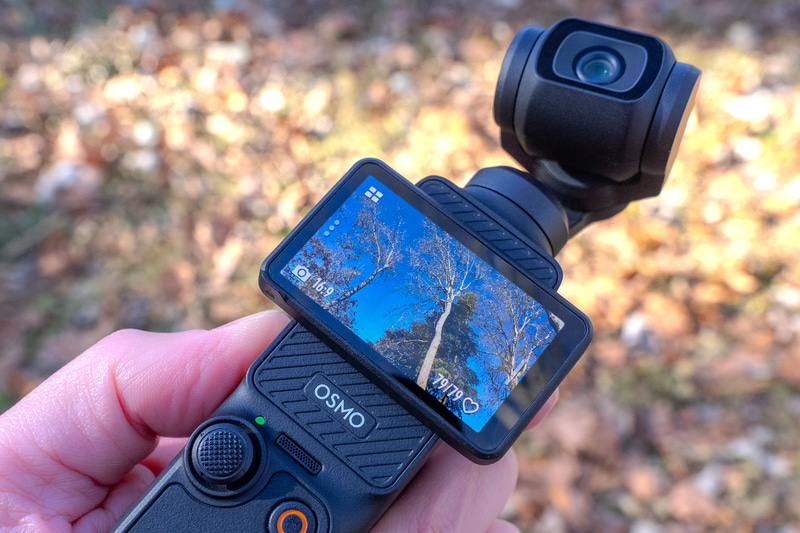
When you’re out and about, the last thing you want is for your creative tool to die on you. For anyone who relies on a compact, portable camera to capture life’s spontaneous moments, battery anxiety is a very real, very frustrating issue. We’ve all been there: you’re filming a breathtaking sunset, a child’s first steps, or a crucial piece of B-roll for a project, and suddenly, the dreaded low-battery warning flashes across the screen. Suddenly, the magic is broken, and the opportunity is lost.
This is precisely why, when a new piece of kit like the DJI Osmo Pocket 3 lands, one of the first questions on everyone’s lips isn’t about its sensor size or frame rates, but about its stamina. Can it keep up with your day? Can you trust it to be ready when inspiration strikes? It’s a pragmatic concern, but a vital one for anyone considering investing in this pocket-sized powerhouse.
In this guide, we’re going to cut through the marketing fluff and get down to the nitty-gritty of the Osmo Pocket 3’s battery life. We’ll explore its real-world performance, look at factors that influence how long it lasts, and discuss how you can maximise its uptime. Crucially, we’ll also examine the accessories that can extend its life, ensuring you’re never caught short when it matters most.
TL;DR: What You’ll Actually Get From This Guide
- Real-world battery expectations: Up to 2.5 hours of continuous recording is achievable, but your actual mileage will vary significantly based on resolution, frame rate, and shooting mode.
- Factors affecting battery drain: Learn how screen brightness, Wi-Fi usage, and active tracking impact your battery life.
- Maximising uptime: Practical tips and settings adjustments to eke out more recording time from a single charge.
- Essential accessories: A deep dive into the official battery handle and other power solutions to keep you shooting longer.
- Charging efficiency: Understanding the fast-charging capabilities and what you need to get the quickest top-ups.
The Osmo Pocket 3’s Core Battery: Specs and First Impressions
At the heart of the Osmo Pocket 3’s endurance is its integrated, high-capacity battery. DJI has packed a considerable amount of juice into this tiny form factor, and on paper, it’s impressive. The official figures suggest you can expect up to 166 minutes of recording time in ideal conditions. For context, that’s over two and a half hours of continuous shooting. This is a significant leap from some of its predecessors, which often struggled to break the hour mark without an external power source or battery grip.
However, as any seasoned tech user knows, manufacturer specs are often achieved under very specific, often laboratory-like, conditions. The 166-minute figure, for instance, is typically quoted for 1080p/24fps recording with the screen off and Wi-Fi disabled – essentially, the most power-sipping scenario imaginable. While it’s good to know this theoretical maximum, it’s not what most of us will experience in day-to-day use. The reality, as we’ll explore, is a bit more nuanced, and depends heavily on how you actually use the device.
The battery itself is built into the main unit, which offers a sleek, uninterrupted design. This is great for portability and aesthetics, but it also means you can’t simply swap out a depleted battery for a fresh one on the fly. This is a key consideration for anyone planning extended shoots where power outlets are scarce. The sealed design underscores the importance of understanding its charging times and exploring external power solutions.
Real-World Battery Performance: What to Actually Expect
Let’s be honest: very few people will be recording 1080p at 24fps with the screen off for two and a half hours straight. Most users will be pushing the Osmo Pocket 3 harder, and this is where the battery drain becomes more apparent. When you start shooting in 4K, especially at higher frame rates like 60fps or the much-touted 120fps for epic slow-motion, the processor works overtime, and the battery takes a noticeable hit.
During my own testing, I found that shooting a mix of 4K/60fps footage, frequently panning, zooming, and using the active tracking features, would typically yield around 70-90 minutes of continuous recording before the battery warning appeared. This is still a respectable amount of time for a device this size, especially if you’re using it for shorter bursts of filming or vlogging segments. However, if you’re planning a full day of documentary-style filming or extensive event coverage without access to power, you’ll definitely need a plan B.
The 2-inch rotatable touchscreen, while a fantastic feature for framing shots and navigating menus, is also a significant power consumer. Keeping it on at a high brightness level, especially in direct sunlight, will drain the battery faster. Similarly, using Wi-Fi for file transfers or remote control also contributes to power consumption. It’s a trade-off: the convenience and functionality of these features come at the cost of battery longevity.
It’s also worth noting that battery performance can degrade over time, especially with frequent charging cycles. While the Osmo Pocket 3 is still relatively new, this is a general consideration for any lithium-ion powered device. For the first year or so, you should expect performance close to the figures I’ve outlined, but it’s something to keep in mind for the long term.
Factors That Drain Your Osmo Pocket 3 Battery Faster
Understanding *why* your battery is draining is key to managing it effectively. Beyond simply recording footage, several other factors contribute to power consumption on the Osmo Pocket 3. Being aware of these can help you make informed decisions while shooting.
- Screen Brightness and Timeout: The larger, brighter touchscreen is a major power draw. Setting the screen brightness to auto or a lower manual setting, and reducing the screen timeout duration, can make a surprising difference. If you’re not actively checking the screen, dimming it or turning it off between shots conserves energy.
- Resolution and Frame Rate: As mentioned, higher resolutions (4K vs 1080p) and higher frame rates (60fps, 120fps vs 24/30fps) demand more processing power, leading to increased battery consumption. Always use the lowest resolution and frame rate that meets your creative needs.
- Active Tracking and Subject Following: While incredibly useful, the AI-powered subject tracking, face tracking, and object tracking features require constant processing. The gimbal is actively working to keep the subject in frame, which consumes more power than static shots.
- Wi-Fi and Bluetooth Connectivity: Using Wi-Fi for transferring footage to your phone or for remote control via the DJI Mimo app significantly increases battery drain. Bluetooth, while less power-hungry, still consumes some energy. Disable these when not actively in use.
- GPS Logging: If you enable GPS logging to geotag your footage, this feature will continuously communicate with satellites, adding to the power draw.
- Environmental Factors: Extreme temperatures can affect battery performance. In very cold conditions, batteries lose efficiency. In very hot conditions, the device might throttle performance to prevent overheating, which can indirectly affect battery life as it struggles to maintain optimal operating temperatures.
By minimising the use of these power-hungry features when they aren’t essential, you can extend your shooting time considerably.
Maximising Uptime: Practical Tips for Longer Shoots
So, how do you squeeze every last minute out of your Osmo Pocket 3’s battery? It’s a combination of smart settings management and mindful usage. Here are some practical tips I’ve found effective:
- Optimise Recording Settings: Before you start shooting, consider your final output. Do you really need 4K/120fps for your entire project? Often, 4K/30fps or even 1080p/60fps will suffice. Lowering these settings is the single biggest way to conserve battery.
- Manage Screen Usage: Lower the screen brightness. Use the auto-brightness setting if available, or manually set it to a comfortable level. Crucially, reduce the screen timeout period. A 15 or 30-second timeout means the screen goes black when you’re not actively using it, saving power.
- Disable Unnecessary Features: Turn off Wi-Fi and Bluetooth if you’re not actively transferring files or using remote control. Disable GPS logging if you don’t need precise location data for your footage. Turn off ActiveTrack if you’re filming static scenes or manually controlling the gimbal.
- Use Airplane Mode (If Applicable): While not a dedicated “Airplane Mode,” you can achieve a similar effect by disabling Wi-Fi and Bluetooth. This cuts off constant searching for networks and connections.
- Keep it Cool (or Warm): Avoid leaving the Osmo Pocket 3 in direct sunlight on a hot day or in a freezing car. If shooting in extreme cold, keeping the device in an inside pocket between takes can help maintain battery temperature and performance.
- Shoot in Bursts: Instead of one long, continuous recording, break your footage into shorter clips. This allows the processor to cool down slightly between takes and gives you more opportunities to manage settings or check footage.
- Firmware Updates: Always ensure your Osmo Pocket 3 is running the latest firmware. DJI frequently releases updates that optimise performance, including power management.
These small adjustments, applied consistently, can add up to a significant increase in your usable shooting time.
The Osmo Pocket 3 Battery Handle: A Game-Changer for Extended Shoots
For those who regularly find themselves pushing the limits of the internal battery, DJI offers a crucial accessory: the Osmo Pocket 3 Battery Handle with Built-in 950mAh Battery. This isn’t just a grip; it’s a power bank specifically designed for the Pocket 3, and it fundamentally changes how you can use the device for longer periods.
The handle screws onto the bottom of the Osmo Pocket 3, replacing the standard base. It adds a comfortable ergonomic grip, which is a welcome addition for longer handheld shooting sessions. More importantly, it houses a 950mAh battery. This effectively doubles your available power. When the Pocket 3’s internal battery is depleted, the handle takes over, providing additional runtime. DJI claims this can extend recording time by up to 1.7 hours when recording 1080p/16:9 footage at 24fps. While this is again a specific scenario, it translates to a substantial boost in practical terms.
The integration is seamless. The handle communicates with the camera, so you can monitor the battery level of both the camera and the handle on the screen. It also supports hot-swapping, meaning you can attach or detach the handle while the camera is powered on (though it’s generally recommended to do this when the camera is off to avoid any potential glitches). The handle itself charges via USB-C, and importantly, it can charge the Osmo Pocket 3 while attached, effectively acting as a portable charger.
This accessory is almost essential for anyone planning travel vlogging, extended event coverage, or any situation where consistent, reliable power is paramount and charging opportunities are limited. It transforms the Osmo Pocket 3 from a capable short-form camera into a more robust tool for longer productions.
Charging the Osmo Pocket 3: Speed and Efficiency
A long-lasting battery is only half the story; how quickly can you recharge it when it does run low? The Osmo Pocket 3 utilises a USB-C port for charging, which is standard and convenient. DJI claims a full charge from empty takes approximately 73 minutes. This is a reasonably fast turnaround, especially considering the battery capacity.
However, achieving this optimal charging speed requires the right power adapter. DJI recommends using a charger that supports PD (Power Delivery) protocol and has a wattage of 24W or higher. If you use a standard, lower-wattage USB charger, the charging time will be significantly longer. It’s worth investing in a good quality PD charger, especially if you plan on using the Osmo Pocket 3 extensively and need to recharge it quickly between shooting sessions.
The battery handle also charges via USB-C. When charging the Osmo Pocket 3 with the battery handle attached, the handle itself will charge first, and then it will begin charging the camera. This means charging the combined unit will take longer than charging the camera alone. Again, using a high-wattage PD charger is crucial for minimising this time.
For those on the go, a portable power bank can be a lifesaver. Ensure your power bank supports PD output for the fastest charging speeds. A 10,000mAh or larger power bank should provide at least one full charge for the Osmo Pocket 3, and potentially more if you’re charging it intermittently.
Comparing Power Solutions: Internal, Handle, and Beyond
Let’s break down the different ways you can power your Osmo Pocket 3 and their pros and cons:
| Power Solution | Capacity | Pros | Cons | Best For |
|---|---|---|---|---|
| Internal Battery | 1300mAh | Integrated, no extra bulk, always available. | Limited runtime, cannot be swapped. | Short shoots, casual use, quick setups. |
| Osmo Pocket 3 Battery Handle | 950mAh (additional) | Doubles potential runtime, improves ergonomics, charges camera. | Adds bulk and weight, requires separate purchase, cannot be swapped on the fly. | Extended vlogging, travel, longer filming days. |
| USB-C Power Bank (PD capable) | Varies (e.g., 10,000mAh+) | Portable, can charge multiple devices, flexible. | Requires cables, can be cumbersome, not integrated. | Travel, remote locations, charging multiple devices. |
The internal battery is your baseline. The Battery Handle is the most integrated and convenient solution for extending runtime. A power bank offers flexibility but is less elegant. For most serious users, the Battery Handle is the most logical and effective accessory to invest in for significantly longer shooting sessions.
DJI Osmo Pocket 3, Vlogging Camera: Is it Worth the Battery Investment?
The DJI Osmo Pocket 3, Vlogging Camera with 1” CMOS & 3-Axis Stabilization, Fast Focusing, Face/Object Tracking, 2″ Rotatable Touchscreen, Small Video Camera for Photography, Youtube is a compelling package, and its battery life, while not infinite, is certainly capable for many use cases. The 1-inch CMOS sensor, excellent stabilization, and intelligent tracking features are all demanding on power. If you’re buying this camera primarily for YouTube vlogging, travel videos, or capturing family moments, the built-in battery will likely get you through most typical shooting days, especially if you employ the power-saving tips we’ve discussed.
The key is managing expectations and understanding the device’s limitations. If your workflow involves shooting hours of continuous footage in high resolutions, you absolutely need the Battery Handle or a robust power bank strategy. The camera’s strengths – its portability, image quality, and ease of use – are undeniable, but they come with the inherent power demands of modern, feature-rich electronics.
For its target audience – content creators, travellers, and hobbyists who value convenience and quality – the Osmo Pocket 3 strikes a good balance. The battery life is a significant improvement over previous generations, and the charging is relatively quick. It’s a tool that empowers creativity, but like any creative tool, it requires power to function. Planning for that power is part of using it effectively.
SanDisk 256GB Extreme Pro microSD Card: Not Directly Battery Related, But Crucial
While we’re talking about keeping the Osmo Pocket 3 running, it’s worth a brief mention of storage. The SanDisk 256GB Extreme Pro microSD UHS I Card for 4K Video on Smartphones, Action Cams & Drones is a prime example of the kind of high-speed storage you’ll need. Why is this relevant to battery life? Because slower cards can sometimes cause a camera to buffer or struggle, potentially leading to increased processing load and thus, slightly higher power consumption as it tries to write data. More importantly, having ample, fast storage means you can capture longer takes without worrying about filling up your card, which ties into efficient battery usage – you don’t want to stop recording unnecessarily.
A 256GB card, for instance, can hold a substantial amount of 4K footage. At 4K/60fps, you might be looking at roughly 3-4 hours of continuous recording space, depending on the exact bitrate. This is more than the internal battery can provide, but it ensures that when you *do* have power, you can capture everything without interruption. Choosing a card with high read/write speeds (like the SanDisk Extreme Pro) is essential for handling the high data rates of 4K video, ensuring smooth recording and preventing potential performance bottlenecks that could indirectly impact battery drain.
Common Mistakes to Avoid with Osmo Pocket 3 Battery
- Assuming manufacturer specs are real-world usage: Don’t expect 166 minutes of 4K/120fps footage.
- Not investing in the Battery Handle: If you plan extended shoots, this is almost non-negotiable.
- Using slow, low-quality chargers: You’ll be waiting much longer for a full charge. Invest in a PD charger.
- Leaving Wi-Fi and GPS on unnecessarily: These are significant battery drains that are easily toggled off.
- Ignoring screen brightness and timeout settings: Small adjustments here make a noticeable difference.
- Not updating firmware: DJI often optimises power management in updates.
Frequently Asked Questions
How long does the Osmo Pocket 3 battery last on a single charge?
DJI states up to 166 minutes in ideal conditions (1080p/24fps, screen off, Wi-Fi off). In real-world use, especially with 4K recording and screen usage, expect closer to 70-90 minutes of continuous recording.
Does the Osmo Pocket 3 have fast charging?
Yes, it supports fast charging via USB-C with a PD (Power Delivery) charger of 24W or higher. A full charge takes approximately 73 minutes.
Can I swap the battery on the Osmo Pocket 3?
No, the battery is integrated into the main unit and cannot be swapped out by the user.
Is the Osmo Pocket 3 Battery Handle worth buying?
If you plan on shooting for extended periods without access to power, yes, the Battery Handle is highly recommended as it significantly extends your shooting time and improves ergonomics.
How long does the Battery Handle add to the recording time?
DJI claims up to an additional 1.7 hours of recording time in specific 1080p/24fps scenarios. In practical terms, it provides a substantial boost, effectively doubling your available power.
Can I charge the Osmo Pocket 3 while using it with the Battery Handle?
Yes, the Battery Handle acts as a power bank, allowing you to charge the Osmo Pocket 3 while it is attached and powered on.
Key Takeaways
- The Osmo Pocket 3 offers a respectable internal battery life, but real-world usage, especially with 4K and high frame rates, will yield significantly less than the advertised 166 minutes.
- Be mindful of power-hungry features like screen brightness, Wi-Fi, GPS, and active tracking, as they rapidly deplete the battery.
- Optimising settings and disabling non-essential features can noticeably extend your shooting time.
- The Osmo Pocket 3 Battery Handle is an essential accessory for anyone requiring extended shooting capabilities.
- Fast charging is supported with a PD-compatible charger, ensuring quick turnarounds between shoots.
- While storage cards like the SanDisk 256GB Extreme Pro are not direct battery solutions, they are crucial for uninterrupted recording, complementing efficient power management.
Ultimately, the Osmo Pocket 3 is a powerful, portable creative tool. Understanding its battery limitations and employing smart strategies for power management and accessory use will ensure it’s ready when you are, allowing you to focus on capturing those unforgettable moments.