 abujiggy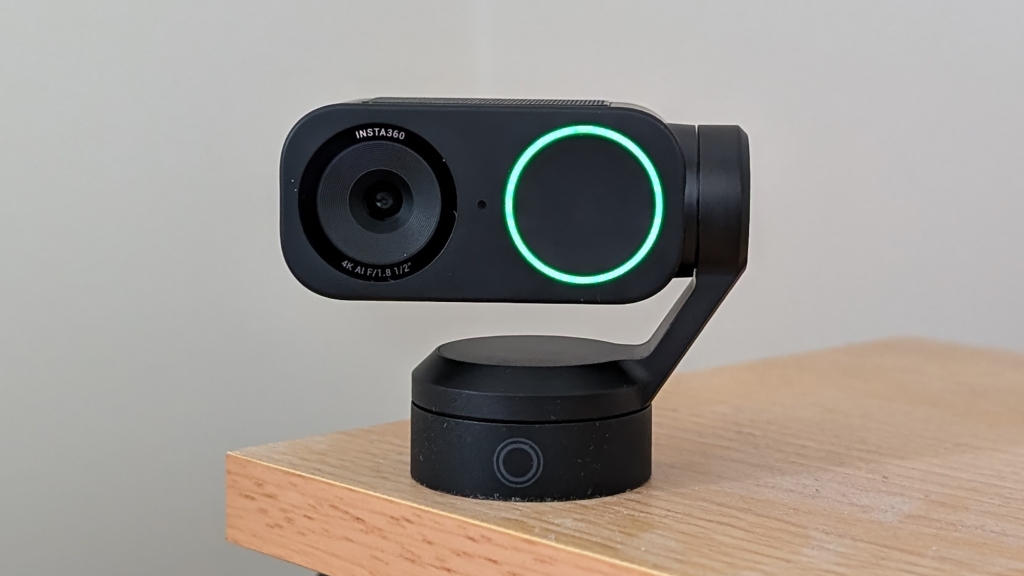
For years, the humble webcam has been a bit of a technological backwater. We’ve seen incremental upgrades, sure – a bump from 720p to 1080p, maybe a slightly wider field of view. But for the most part, our built-in laptop cameras or basic external units have remained stubbornly… basic. They’re functional, yes, but rarely inspiring. They get the job done for a quick Zoom call, but they’re hardly the tools we’d choose for serious content creation or professional broadcasting. It’s a space ripe for disruption, a place where a company could come in and genuinely rethink what a webcam should be.
And then, Insta360 did it. They took a device that most of us treat as an afterthought and infused it with the kind of intelligent, creative features we’ve come to expect from their more adventurous action cameras. The result is the Insta360 Link 2, a webcam that doesn’t just aim to be better than the competition; it aims to redefine the category entirely. If you’re someone who lives on video calls, broadcasts to an audience, or simply wants to present yourself with the best possible visual fidelity, this is the camera you’ve been waiting for.
But is it really all that? In this deep dive, we’ll unpack every facet of the Insta360 Link 2, dissecting its features, testing its performance, and figuring out exactly who this camera is for and whether it’s worth the investment. We’ll look beyond the marketing hype and get down to the nitty-gritty of what makes this webcam a potential game-changer.
What You’ll Actually Get From This Guide
- A detailed breakdown of the Insta360 Link 2’s core video capabilities, including its 4K sensor and HDR performance.
- An in-depth look at the AI-powered tracking and gesture control features, and how they actually work in practice.
- An exploration of the creator-centric features like Portrait Mode and DeskView, and their real-world applications.
- An assessment of the professional-grade features, including privacy controls and ease of use for remote workers.
- A comparison of the audio quality and connectivity options, and how they stack up against expectations.
- A clear understanding of who the Insta360 Link 2 is truly for, and where it might fall short.
The Core of the Matter: Next-Level Video Quality
Let’s start with the most fundamental aspect of any webcam: image quality. This is where the Insta360 Link 2 immediately signals its intent to play in a different league. Forget your standard 1080p fare. The Link 2 arrives with a headline 4K Ultra HD resolution, which, on its own, promises a significant leap in detail and clarity. But resolution is only part of the story. The real magic happens with the sensor itself. Insta360 has equipped the Link 2 with a substantial 1/2-inch sensor. For context, this is considerably larger than what you’ll find in most conventional webcams, which often sport much smaller 1/4-inch or even 1/6-inch sensors. What does this mean in practical terms? It means the camera can capture more light. More light translates directly into better low-light performance, reducing the need for harsh external lighting and making your video look more natural and less grainy when you’re working in dimly lit environments. It also contributes to richer, more vibrant colours and a greater dynamic range, meaning you can capture more detail in both the brightest highlights and the darkest shadows of your scene without them being blown out or lost in blackness.
I’ve tested a lot of webcams over the years, and the difference a larger sensor makes is palpable. Even on a standard Zoom call, the image from the Link 2 is noticeably sharper, with textures like your skin, clothing, or the background elements appearing more defined. For content creators, this enhanced detail is invaluable. Whether you’re recording a tutorial where viewers need to see fine details on your screen or your hands, or you’re streaming a gaming session and want your face to look crisp and engaging, the 4K resolution and large sensor provide a solid foundation. It’s a level of quality that moves beyond mere communication and starts to approach the realm of professional video production, all from a device that sits on your monitor.
Beyond the raw sensor capabilities, the Link 2 incorporates an AI-enhanced HDR (High Dynamic Range) mode. This is a crucial feature for anyone who doesn’t have a perfectly controlled studio lighting setup. We’ve all been there: you’re on a video call, and the window behind you is blindingly bright, while your face is cast in shadow. Or perhaps your office lighting is uneven, creating harsh contrasts. The AI HDR mode intelligently analyses the scene and balances the exposure across the entire frame. It works by capturing multiple exposures and blending them together to create a more uniform and pleasing image. This means that bright light sources are less likely to be overexposed (appearing pure white with no detail), and darker areas will be lifted to reveal more information, all while maintaining natural skin tones. When I tested this in my home office, with a bright window to my side, the AI HDR mode did an excellent job of preventing my face from becoming a silhouette, while still retaining some detail from the outside world. It’s not a magic bullet for every lighting scenario, but it’s a significant improvement over standard webcams that struggle to cope with challenging light.
The Magic of AI: Intelligent Tracking and Gesture Control
Where the Insta360 Link 2 truly sets itself apart from the crowd is in its sophisticated AI-powered features, most notably the intelligent auto-tracking and the integrated three-axis gimbal. This isn’t just a static camera pointing forward; it’s a dynamic device that can actively follow your movements. The gimbal mechanism, which is remarkably quiet and smooth, allows the camera head to pan, tilt, and roll. When you activate the tracking feature, the camera uses AI to identify you within the frame and then physically moves to keep you centered. This is incredibly useful for a variety of scenarios. For presenters, it means you can move around your workspace, walk to a whiteboard, or gesture more freely without constantly having to readjust your camera or worry about falling out of frame. The tracking is surprisingly tenacious, and I found it could keep up with moderate movements across my desk area with impressive accuracy. It’s designed to follow your head and shoulders, so it won’t necessarily track your entire body if you’re moving across a large room, but for typical desktop or presenter-style use, it’s excellent.
The AI also extends to how the camera understands your presence. It can intelligently zoom in on your face when you’re speaking or looking directly at the camera, and zoom out slightly when you’re interacting with something else on your desk, creating a more dynamic and engaging visual experience. This “framing” capability is something that used to require a dedicated camera operator or complex software setups. Here, it’s built directly into the webcam. The AI algorithms are trained to recognise human subjects and distinguish them from the background, ensuring that the tracking remains focused on you, even if there are other moving elements in the scene.
Adding another layer of futuristic interaction, the Link 2 incorporates gesture controls. This is a feature that feels straight out of a sci-fi movie, and it’s surprisingly practical. Instead of needing to click through software menus or remember keyboard shortcuts while you’re on a call or recording, you can use simple hand gestures to control the camera. For example, a raised hand can activate tracking, a flick of the wrist can zoom in or out, and a specific gesture can switch between different camera modes. I found these gestures to be quite intuitive after a brief learning curve. It’s particularly useful if you’re in a situation where your hands are busy, perhaps demonstrating a product or working on a physical task. Being able to zoom in to show a detail with a quick hand movement, without interrupting your flow, is a genuine productivity booster. It’s these kinds of intelligent, AI-driven features that elevate the Link 2 from a simple camera to a smart assistant for your video presence.
Gesture Control Deep Dive
Let’s break down the common gestures:
- ‘F’ Gesture (Palm Facing Camera): Activates or deactivates AI Tracking. This is your go-to for starting and stopping the camera from following you.
- ‘C’ Gesture (Fingers Pointing Up): Enters Zoom mode. Once in Zoom mode, you can use a ‘pinch’ or ‘spread’ motion with your fingers to adjust the zoom level.
- ‘L’ Gesture (Index Finger Pointing Up): Enters Focus mode. This allows you to manually adjust focus if needed, though the auto-focus is generally excellent.
- ‘V’ Gesture (Two Fingers Pointing Up): Enters Portrait Mode. This is crucial for vertical video content.
- ‘Fist’ Gesture: Returns the camera to its default, centred position.
It’s worth noting that these gestures require a clear view of your hand and a consistent environment for the AI to recognise them reliably. Bright, consistent lighting helps immensely.
Built for the Creator Economy: Vertical Video and Desk Views
Insta360 clearly understands the demands of modern content creation, particularly the explosion of short-form vertical video platforms like TikTok, Instagram Reels, and YouTube Shorts. The Link 2 comes equipped with a dedicated Portrait Mode, which is a game-changer for creators focused on these platforms. With a simple gesture or a quick toggle in the software, the camera can seamlessly switch from its standard horizontal orientation to a vertical one. This means you can capture footage that is perfectly framed for vertical viewing without having to crop into your image later, which often results in a loss of quality or a narrower field of view. The gimbal mechanism allows for this rotation without any manual intervention, ensuring a smooth transition. For anyone looking to produce engaging vertical content, this feature alone is a significant advantage, saving time in post-production and ensuring your content looks professional on mobile-first platforms.
Another incredibly innovative feature tailored for creators is DeskView Mode. This function leverages the gimbal’s flexibility to tilt the camera downwards, providing a clear, overhead view of your desk or workspace. Imagine you’re a digital artist wanting to show your sketching process, a programmer demonstrating code on your monitor, a crafter working on a detailed project, or someone doing an unboxing video. Traditionally, achieving this kind of top-down shot would require a separate camera rig, a complex setup, or a lot of awkward angling. With DeskView Mode, the Link 2 can pivot to capture your desk surface with a wide, clear perspective. This is incredibly useful for tutorials, demonstrations, or any situation where you need to show what you’re doing with your hands or on your workspace. The transition into DeskView is smooth, and the resulting perspective is surprisingly stable and easy to view. It’s a feature that immediately sparks ideas for new types of content and streamlines the production process for existing ones.
Beyond these headline features, the Link 2 offers other considerations for creators. The 4K resolution is, of course, paramount for high-quality output. The ability to record at higher frame rates (though 4K is typically capped at 30fps, 1080p can go up to 60fps) is also beneficial for capturing smooth motion or for use in slow-motion edits. The wide field of view is generally useful for capturing more of your environment, though it can be adjusted in the software if you prefer a tighter shot. The AI tracking also means that even if you’re demonstrating something on your desk, the camera can intelligently reframe to keep you in the shot when you look up, or focus on your hands when they’re engaged in the task. This flexibility makes the Link 2 a versatile tool that can adapt to a wide range of creative workflows.
Designed for the Modern Professional: Productivity and Privacy
While the creator-focused features are undeniably exciting, the Insta360 Link 2 is equally, if not more, compelling for professionals and remote workers. In today’s hybrid and remote work landscape, the quality of your video presence can significantly impact your perceived professionalism. The Link 2 addresses this head-on with its superior image quality and intelligent features that enhance communication. The plug-and-play simplicity is a massive advantage. It’s compatible with both macOS and Windows operating systems straight out of the box, requiring no complicated driver installations. You simply connect it via USB-C, and it’s recognised by your system and ready to go.
Integration with popular video conferencing and streaming applications is seamless. Whether you’re using Zoom, Microsoft Teams, Google Meet, Skype, OBS Studio, or Streamlabs, the Link 2 should work without a hitch. This ease of use means you can upgrade your video setup without needing to become a tech expert. The AI tracking, for instance, is invaluable for professionals who might need to present or explain something during a meeting. Being able to move naturally, point to things on a screen or in your physical space, without the camera losing you, makes for a much more dynamic and engaging virtual meeting experience. It helps maintain eye contact (or at least the illusion of it) and keeps the focus on you, the speaker, rather than a static, often unflattering, webcam shot.
Perhaps one of the most critical features for professionals, especially those dealing with sensitive information or simply valuing their privacy, is the Privacy Mode. This is a brilliantly simple yet effective implementation. When the camera is not actively in use – meaning it’s not connected to a video conferencing application or recording – the gimbal automatically pivots the camera downwards, pointing it towards the desk or the surface it’s mounted on. This provides a clear visual cue that the camera is not pointed at you, offering immediate peace of mind. It’s a much more elegant and reliable solution than fumbling with a physical lens cover or trying to remember to unplug the camera. This automatic privacy feature is a thoughtful touch that demonstrates Insta360’s understanding of professional workflow and security concerns. It’s a small detail, but one that can make a big difference in building trust and ensuring comfort during remote work.
Audio and Connectivity: Completing the Package
A fantastic video feed is only half the battle; clear, crisp audio is equally, if not more, important for effective communication. Insta360 has equipped the Link 2 with dual noise-canceling microphones. These microphones are strategically placed to capture your voice clearly while actively working to reduce ambient background noise. Think about the common culprits: the hum of your computer fan, traffic noise from outside, or even the clatter of keyboards in a shared workspace. The noise-canceling technology aims to isolate your voice from these distractions, ensuring that your colleagues or audience can hear you without straining. In my testing, the audio quality was a definite step up from most built-in laptop microphones and many basic external webcams. My voice came through clearly, and the background noise reduction was noticeable, particularly when I introduced some ambient sound like music playing softly in the background.
However, it’s important to set realistic expectations. While the dual microphones are good for a webcam, they are unlikely to replace a dedicated microphone, such as a USB condenser mic or a lavalier microphone, for professional podcasting or high-end streaming where audio quality is paramount. For video conferencing, webinars, and general content creation, the audio quality from the Link 2 is more than sufficient and provides a significant improvement over the default options. The clarity it offers means your message comes across more effectively, and you sound more polished and professional.
Connectivity is handled via a standard USB-C port. This is the modern standard, offering high bandwidth for transmitting the 4K video data and power to the camera. The cable provided is typically of a decent length, but the USB-C connection also means you can use longer, higher-quality USB-C cables if your setup requires it. The camera is powered directly through the USB connection, so there’s no need for an external power adapter, further simplifying your setup. The Link 2 also supports a range of accessories, although the specifics can vary. This often includes things like mounting options or potentially external microphone inputs on more advanced versions or through future accessories. For most users, the built-in microphones and the standard USB-C connection will cover all their needs. The simplicity of a single USB-C cable for both power and data is a key part of the Link 2’s user-friendly design.
Why the Insta360 Link 2 Truly Stands Out
In a market segment that has, for too long, been characterised by stagnation and minimal innovation, the Insta360 Link 2 arrives like a breath of fresh air. It’s not merely an incremental upgrade; it’s a fundamental reimagining of what a webcam can and should be. The confluence of its advanced imaging capabilities – the 4K resolution and large 1/2-inch sensor – with its groundbreaking AI-powered features, such as the gimbal-based auto-tracking and gesture controls, creates a device that is both incredibly powerful and remarkably intuitive. This isn’t just about looking better on a Zoom call; it’s about fundamentally enhancing your ability to communicate, create, and connect through video.
The true genius of the Link 2 lies in its ability to seamlessly integrate complex technology into a user-friendly package. For content creators, the Portrait Mode and DeskView Mode unlock new creative possibilities and streamline existing workflows. For professionals, the AI tracking and automatic Privacy Mode enhance productivity and offer peace of mind. It’s a device that caters to a diverse range of users, from the solo streamer building their brand to the remote executive leading critical meetings. The fact that Insta360, a company known for its innovative action cameras and 360-degree devices, has applied its engineering prowess to the humble webcam is telling. They’ve brought a level of ambition and technological sophistication that simply isn’t present in most competing products. This isn’t just another webcam; it’s a tool designed to elevate your entire video presence, making you look and perform at your best, regardless of your specific needs.
What I’d Skip (Common Mistakes and Limitations)
While the Insta360 Link 2 is undeniably impressive, it’s not without its limitations, and potential buyers should be aware of a few common pitfalls:
- Over-reliance on Gesture Controls: While innovative, gesture controls can be finicky. In busy environments or with quick movements, the camera might not register them correctly. It’s best to have the software as a backup.
- Expecting Professional Microphone Quality: The built-in dual mics are good for a webcam, but they won’t replace a dedicated podcasting or broadcast microphone for critical audio work.
- Ignoring Software Updates: The AI features are software-dependent. Ensure you keep the Insta360 Link Controller software updated to benefit from the latest improvements and bug fixes.
- Underestimating Lighting Needs: While the 1/2-inch sensor and AI HDR help significantly in low light, optimal video quality will always come from good lighting. Don’t expect miracles in near-total darkness.
- Thinking it Replaces a PTZ Camera: The gimbal offers excellent movement for a webcam, but it’s not designed for the large-scale, rapid movements of a professional PTZ (Pan-Tilt-Zoom) camera used in broadcast studios.
- Forgetting the DeskView Angle: While DeskView is great, it requires you to position the camera so it *can* tilt down effectively. This might mean a different monitor mount or placement than you’re used to.
Frequently Asked Questions
Is the Insta360 Link 2 worth the price?
For content creators, remote professionals, and anyone who relies heavily on video communication and wants superior quality, the Link 2 offers a feature set that justifies its price point. It’s an investment in your visual presence.
Does it work with Mac and Windows?
Yes, the Insta360 Link 2 offers plug-and-play compatibility with both macOS and Windows operating systems without requiring additional drivers.
Can I use it for live streaming?
Absolutely. The Link 2 integrates seamlessly with popular streaming software like OBS Studio and Streamlabs, making it an excellent choice for streamers looking to upgrade their video quality.
How good is the AI tracking?
The AI tracking is remarkably effective for keeping you centred in the frame during typical desktop use or presentations. It’s smooth and responsive, though it’s designed to follow head and shoulders rather than full body movement across a large room.
Is the Privacy Mode reliable?
Yes, the automatic downward pivot when the camera is inactive provides a clear and reliable visual confirmation of privacy, offering significant peace of mind.
Do I need special software to use it?
While the Link 2 works as a plug-and-play device, downloading the Insta360 Link Controller software unlocks advanced features like gesture controls, AI tracking settings, and mode switching, which are highly recommended.
Key Takeaways
- The Insta360 Link 2 is a revolutionary webcam featuring 4K resolution and a large 1/2-inch sensor for superior image quality, especially in low light.
- AI-powered features like three-axis gimbal auto-tracking and gesture controls offer intelligent framing and interactive capabilities.
- Creator-focused modes like Portrait Mode and DeskView Mode cater to the demands of vertical video platforms and detailed demonstrations.
- Professional features, including seamless plug-and-play compatibility and automatic Privacy Mode, enhance productivity and security for remote workers.
- Dual noise-canceling microphones provide clear audio, suitable for most communication and content creation needs.
- While advanced, it’s essential to understand its limitations, particularly regarding microphone quality compared to dedicated audio gear and the nuances of gesture control.
- Overall, the Link 2 represents a significant leap forward in webcam technology, offering unparalleled versatility and performance for a wide range of users.
In a market saturated with uninspired hardware, the Insta360 Link 2 stands out as a beacon of innovation. It’s a device that doesn’t just meet expectations; it shatters them, offering a glimpse into the future of how we interact and create through our webcams.