 abujiggy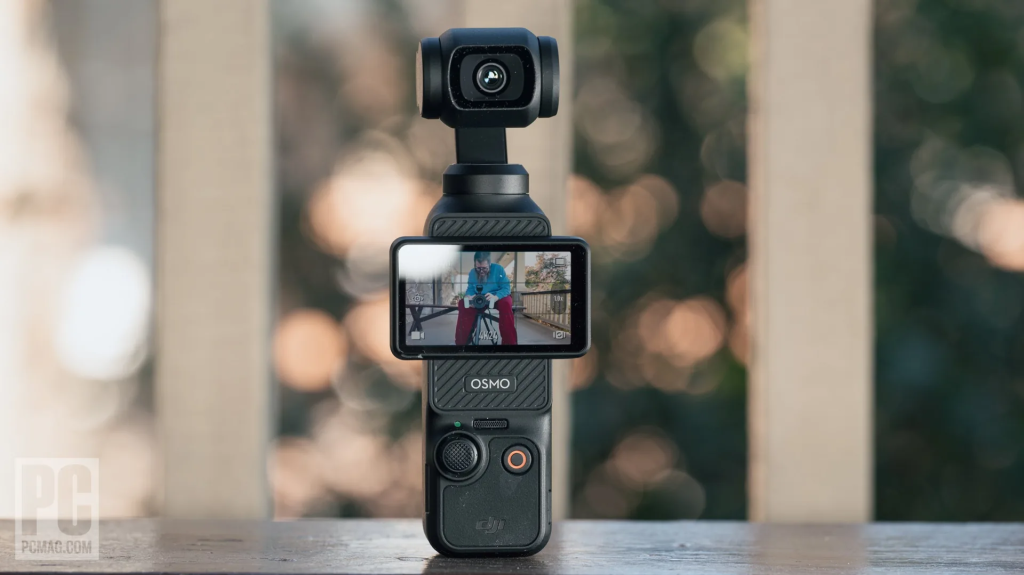
For years, the promise of a truly pocketable, high-quality video camera felt like a myth. We’ve all been there: fumbling with an oversized phone, its battery draining faster than a desert oasis, or wrestling with an action camera that, while rugged, often falls short on cinematic flair or low-light performance. I’ve lugged GoPros for their sheer versatility and relied on iPhones for those ‘cinematic moments’, only to be frustrated by their inherent limitations – the phone’s bulk, its abysmal battery life under heavy video loads, and the constant dread of running out of storage for those precious 4K clips. It’s a compromise, a constant juggling act.
My quest was simple: a device that could deliver genuinely cinematic shots, handle challenging low-light conditions at night, and still disappear into a pocket. A tall order, I thought. But then the DJI Osmo Pocket 3 landed on my desk, and it genuinely shifted my perspective on what’s possible for everyday content creation.
This isn’t just another gadget review. This is about whether the Pocket 3 can genuinely replace your current setup, solve those nagging problems, and elevate your creative output without adding more bulk to your life. Let’s dig into the nitty-gritty.
- Beyond the Hype: A grounded, honest assessment of the Pocket 3’s capabilities and limitations, cutting through the marketing fluff.
- Real-World Performance: My personal experience with its 1-inch sensor, stabilisation, and audio integration in diverse scenarios.
- Creator Combo Deep Dive: Is the extra investment truly worth it, or are you better off with just the base unit and select accessories?
- Practical Tips & Workflow: How to maximise battery life, choose the right storage, and integrate the Pocket 3 into your content creation process.
- Who It’s For (and Who It’s NOT For): Helping you decide if this tiny powerhouse is the right tool for your specific needs.
The Vlogger’s Dilemma: Why Your Phone (and Even Your GoPro) Isn’t Cutting It
Before the Pocket 3, my personal video toolkit was a familiar one: a GoPro for action and rugged scenarios, and my iPhone for everything else that needed a touch more ‘polish’. On paper, it sounds like a decent combination. In practice, it was a constant exercise in frustration and compromise. The iPhone, while capable of stunning 4K video, is a battery hog. Seriously, try recording an hour of 4K footage on a chilly day, and watch that percentage plummet. Then there’s the sheer bulk. Holding a modern iPhone steady for vlogging, especially one-handed, quickly becomes an ergonomic nightmare. And storage? Forget about it. A few lengthy 4K clips, and suddenly your phone is screaming for mercy, forcing you to offload footage mid-trip or delete precious photos.
GoPros, on the other hand, are built for abuse. They’re waterproof, tiny, and have excellent electronic image stabilisation. But ‘cinematic’? Not really. The super-wide fisheye look isn’t always desirable, and while their low-light performance has improved, it still lags behind what a larger sensor can achieve. More critically, the lack of a proper gimbal means that while the footage is stable, it lacks that fluid, almost ethereal motion that truly elevates a shot. And let’s not even start on their audio quality, which is passable at best, often requiring external mics and cumbersome setups.
My primary goal was simple: I wanted better cinematic shots, especially in challenging low-light environments like bustling night markets or dimly lit restaurants. I wanted footage that didn’t look like it was shot on a phone or an action cam. I wanted something that felt professional but didn’t require a dedicated camera bag or a crew. This is the gap the Osmo Pocket 3 purports to fill, and it was precisely the device I was looking for to solve these persistent problems.
The tension between convenience and quality has always been palpable for solo creators and travellers. We want to capture incredible moments without being weighed down by gear or constantly worrying about battery life and storage. The Pocket 3 promises to bridge this gap, offering a compelling alternative to the traditional two-device setup. It’s not just about having a small camera; it’s about having a small camera that doesn’t force you to compromise on the quality of your output.
First Impressions: More Than Just a Tiny Gimbal
When you first pick up the Osmo Pocket 3, its size is genuinely striking. It’s incredibly small and lightweight, a true pocket companion. I’ve slipped it into jeans pockets, jacket pockets, and even a small clutch bag without a second thought. This portability is its superpower, making it ideal for spontaneous capture during travel, adventures, or just daily life. Despite its diminutive stature, it feels surprisingly sturdy and well-built. The body is a solid piece of plastic and metal, with no creaks or flex, instilling confidence that it can withstand the rigours of being tossed into a bag.
The most significant design upgrade, however, is the new 2-inch rotatable touchscreen display. This isn’t just a minor tweak; it’s a game-changer for usability. Previous models had tiny, fixed screens that were often difficult to frame shots with, especially in bright sunlight or when trying to vlog yourself. The Pocket 3’s screen rotates with a satisfying click, instantly powering on the device when you twist it into landscape orientation. This clever design means no fumbling for a power button and an immediate readiness to shoot. The screen itself is larger, brighter, and far more responsive, making it genuinely easy to see what you’re shooting, adjust settings, and review footage, even under harsh midday sun.
Ergonomically, it’s a delight. The grip is comfortable, especially when paired with the optional battery handle, which adds just enough heft and length to make it feel secure in your hand. The controls are minimal and intuitive: a joystick for gimbal control, a record button, and a function button. Everything else is handled via the touchscreen, which, thanks to its size and clarity, is a pleasure to navigate. I particularly appreciate the quick access menus for common settings like resolution, frame rate, and colour profiles. It’s a testament to DJI’s design philosophy that they’ve managed to pack so much functionality into such a compact form factor without making it feel cluttered or complex.
For anyone who has struggled with the awkwardness of vlogging with a phone or the limited view of an action camera, the Pocket 3’s design is a breath of fresh air. It’s designed from the ground up for single-operator use, making it an incredibly effective tool for spontaneous, high-quality content creation without drawing undue attention to yourself.
Under the Hood: The 1-inch Sensor and Image Quality That Surprises
This is where the DJI Osmo Pocket 3 truly distinguishes itself from its predecessors and most competitors in its size class. The leap to a significantly larger 1-inch CMOS sensor is not just a spec bump; it’s a fundamental shift in image quality. For context, most smartphones have sensors smaller than 1/2.5 inches, and even many action cameras hover around the 1/1.7-inch mark. A 1-inch sensor captures considerably more light, leading to a noticeable jump in clarity, detail, and dynamic range.
In practice, this means photos are sharp, detailed, and exhibit a much wider dynamic range than I’ve come to expect from such a small device. Highlights are better preserved, and shadows retain more information, reducing the blown-out or crushed look often seen in smaller-sensor cameras. This is particularly evident when shooting in challenging lighting conditions, such as high-contrast scenes or during golden hour. The colours are vibrant and accurate, and the overall image aesthetic is pleasingly natural, not overly processed or artificial.
Video recording is equally, if not more, impressive. The Pocket 3 supports resolutions up to 4K at a buttery-smooth 120 frames per second (fps). This high frame rate is fantastic for capturing slow-motion footage, allowing you to stretch moments without sacrificing quality. But it’s the 10-bit D-Log M colour depth that truly unlocks its potential for professional-looking footage. For those unfamiliar, 10-bit colour captures billions of colours compared to the millions in 8-bit, providing far greater flexibility for colour grading in post-production. D-Log M is a flat colour profile that preserves maximum dynamic range, giving editors more latitude to adjust colours, contrast, and exposure without introducing banding or artifacts. This feature alone elevates the Pocket 3 from a consumer gadget to a serious tool for creators who care about their final output.
I’ve shot extensively with the Pocket 3 in various conditions – bright daylight, overcast skies, and dim evenings. In good light, the footage is crisp, vibrant, and incredibly detailed. But it’s in low light where the 1-inch sensor truly shines. While it won’t magically turn night into day, it captures significantly cleaner, less noisy footage than any phone or action camera I’ve used. Details remain discernible, and colours hold up remarkably well, making it a genuinely viable option for shooting after sunset. The natural shallow depth of field, a characteristic of larger sensors, also adds a pleasing cinematic quality, subtly separating your subject from the background – something almost impossible to achieve with smaller sensors without computational trickery.
Beyond Smooth: Gimbal Stabilisation and ActiveTrack 6.0 Explained
DJI built its reputation on world-class stabilisation, and the Osmo Pocket 3 is no exception. At its core is a 3-axis mechanical gimbal, which is fundamentally superior to any electronic image stabilisation (EIS) found in phones or action cameras. EIS works by cropping into the image and digitally shifting it to counteract movement, which often introduces a ‘jello’ effect, reduces resolution, and can look unnatural. A mechanical gimbal, however, physically moves the camera to maintain a level horizon and smooth out bumps and shakes, resulting in footage that is incredibly fluid and cinematic, even when you’re on the move.
I’ve put this stabilisation through its paces: walking briskly, jogging, even filming from a moving vehicle on a bumpy road. The Pocket 3 consistently delivers remarkably stable footage. There’s no jitter, no micro-shakes, just smooth, gliding motion. This is crucial for vlogging, where you’re often walking and talking to the camera, or for capturing dynamic shots that would otherwise be unusable. The gimbal offers various modes, including Tilt Locked, FPV (First Person View), and Follow, allowing you to adapt to different shooting scenarios. My personal favourite for dynamic movement is FPV, which allows the camera to tilt and roll naturally with your movement, adding an immersive feel without sacrificing smoothness.
But the Pocket 3 doesn’t stop at just mechanical stabilisation; it integrates intelligent tracking with ActiveTrack 6.0. This feature is, frankly, astounding. It allows you to track subjects with incredible accuracy, keeping them perfectly framed in the shot. You simply tap on the subject on the touchscreen, and the gimbal will automatically follow them. ActiveTrack 6.0 boasts several improvements over previous iterations:
- Face Auto-Detect: The camera can automatically detect and track faces, ensuring you’re always in focus and perfectly framed for vlogging.
- Dynamic Framing: It intelligently adjusts the framing to keep the subject in an optimal position within the frame, even if they move erratically.
- Precise Tracking: It’s more robust and less prone to losing subjects, even if they momentarily disappear behind an obstacle.
I’ve used ActiveTrack 6.0 extensively for self-filming, whether walking around a city or demonstrating a task. It works flawlessly, freeing me from worrying about staying in frame and allowing me to focus on my content. It’s also fantastic for filming pets or children, capturing their movements without constant manual adjustments. For solo creators, this feature is a genuine game-changer, turning what would typically be a two-person operation into something you can manage entirely by yourself with professional results. The combination of rock-solid mechanical stabilisation and intelligent tracking makes the Pocket 3 an incredibly versatile and powerful tool for dynamic content creation.
Audio Matters: Why the DJI Mic 2 Integration is a Game Changer (and the Headphone Jack Isn’t)
One of the perennial weaknesses of small cameras, including previous Osmo Pockets and action cameras, has always been audio. Built-in microphones are often tinny, pick up too much ambient noise, and struggle in windy conditions. The original blog post correctly identified “no headphone jack” as a ‘con’, and while technically true, I think it misses the bigger picture of how DJI has approached audio with the Pocket 3.
Instead of a traditional headphone jack, DJI has leaned heavily into wireless audio integration, and it’s a brilliant move. The Pocket 3 features a built-in wireless microphone slot and is designed to seamlessly integrate with the optional DJI Mic 2 system. This isn’t just an accessory; it feels like an integral part of the Pocket 3’s ecosystem. The Mic 2 is a compact, clip-on wireless microphone that delivers incredibly clear, broadcast-quality audio. It connects instantly to the Pocket 3 without any complicated pairing processes, and the audio is recorded directly onto your video files.
Here’s why this setup is a game-changer for creators:
- Superior Audio Quality: The Mic 2 provides crisp, clean vocals, dramatically improving the overall production value of your videos. It also includes wind-noise reduction, which is essential for outdoor vlogging.
- Wireless Freedom: No cables, no messy setups. Just clip on the mic, and you’re good to go. This is invaluable for vlogging, interviews, or any scenario where you need to be hands-free and mobile.
- Internal Recording: The Mic 2 transmitters can record audio internally as a backup, ensuring you never lose your sound, even if the wireless connection drops.
- Stereo Sound: The Pocket 3 can connect to two Mic 2 transmitters simultaneously, allowing for stereo audio or capturing two separate speakers.
While the lack of a 3.5mm headphone jack might seem like a drawback for monitoring audio in real-time, the reality is that for most vlogging and casual content creation, the Mic 2’s reliability and quality largely negate this need. If you’re doing critical audio work, you’d likely be using a dedicated audio recorder anyway. For the target audience of the Pocket 3 – solo creators wanting high-quality, fuss-free audio – the Mic 2 integration is a far more practical and effective solution than a simple headphone jack.
The built-in microphones on the Pocket 3 itself are also surprisingly decent for ambient sound capture, but for dialogue, the Mic 2 is non-negotiable. If you’re serious about your video content, especially anything involving speech, budgeting for the Mic 2 (or the Creator Combo, which includes it) is a must. It transforms the Pocket 3 from a great video camera into a complete, professional-grade vlogging setup.
Powering Your Day: The Battery Life Conundrum and the Essential Handle
The original post correctly listed “short battery life” as a con, and it’s a point worth dwelling on, but also one with a very elegant solution. The Pocket 3, being incredibly compact, houses a relatively small internal battery. On its own, you can expect around 150-160 minutes of 1080p/24fps recording, or closer to 100-110 minutes when shooting 4K/60fps. For a full day of serious shooting, this simply isn’t enough. If you’re like me and constantly reaching for that 4K/120fps mode, you’ll see those numbers drop even further.
This is where the DJI Osmo Pocket 3 Battery Handle with Built-in 950mAh Battery becomes not just an accessory, but an absolutely essential part of the kit. This handle clips securely to the bottom of the Pocket 3, extending its grip and, more importantly, adding an additional 950mAh battery. The internal battery of the Pocket 3 is 1300mAh, so the handle effectively boosts your total battery capacity by about 73%. In real-world terms, this means you can easily double your shooting time, often pushing past 4 hours of continuous 4K recording. For me, this transforms the Pocket 3 from a ‘carry a power bank and cable’ device into a ‘shoot all day without worry’ device.
Here’s why the battery handle is so critical:
- Extended Shooting Time: As mentioned, it significantly prolongs your recording sessions, crucial for travel, events, or long vlogging days.
- Ergonomic Improvement: The handle provides a more substantial grip, making the camera more comfortable and secure to hold, especially for one-handed operation.
- USB-C Passthrough: It features a USB-C port, allowing you to charge both the handle and the Pocket 3 simultaneously, or even power an external device like the DJI Mic 2 receiver.
- Integrated Tripod Mount: The handle also includes a standard 1/4-inch tripod thread, which is surprisingly absent on the base Pocket 3 unit itself. This is vital for mounting it on tripods, selfie sticks, or other accessories.
Without the battery handle, you’ll find yourself constantly topping up the Pocket 3, which can interrupt your creative flow. With it, the battery concern largely evaporates. It’s such a fundamental enhancement to the user experience that I consider it a mandatory purchase. In fact, if you’re considering the Pocket 3, I’d strongly recommend opting for the Creator Combo, as it includes this handle along with the DJI Mic 2, making it a much more complete and capable package right out of the box. For a camera designed for on-the-go content, reliable, extended power is non-negotiable, and the battery handle delivers precisely that.
Storage Solutions: Choosing the Right microSD for 4K/120fps
When you’re dealing with a camera capable of recording 4K video at 120 frames per second with 10-bit colour depth, storage isn’t just an afterthought; it’s a critical component of your setup. These high-resolution, high-bitrate files are massive, and using a slow or insufficient microSD card will lead to dropped frames, corrupted footage, or simply an inability to record at the camera’s highest settings. The original post wisely recommended the SanDisk 256GB Extreme Pro microSD UHS I Card, and that’s an excellent starting point, but let’s delve into why and what to look for.
Here’s what you need to understand about microSD cards for the Pocket 3:
- Speed Class: Look for cards with a V30 (Video Speed Class 30) rating or higher. This guarantees a minimum sustained write speed of 30 MB/s, which is essential for smooth 4K recording. UHS-I Class 3 (U3) is often equivalent to V30. The SanDisk Extreme Pro is typically V30/U3.
- Read/Write Speeds: While the V30 rating is a minimum, higher read and write speeds (like the 200MB/s read and 140MB/s write of the recommended SanDisk Extreme Pro) will significantly improve file transfer times when offloading footage to your computer. This might not affect recording directly if the sustained write speed is met, but it makes your post-production workflow much faster.
- Capacity: 256GB is a good sweet spot.
- A 256GB card can hold approximately 4-5 hours of 4K/60fps 10-bit footage.
- For 4K/120fps, that time will be closer to 2-3 hours.
- If you’re shooting extensively, especially on longer trips, consider carrying multiple 256GB cards or even a single 512GB card.
- Brand Reliability: Stick with reputable brands. SanDisk, Samsung, Lexar, and Kingston are generally reliable choices. Counterfeit cards are rampant, especially on marketplaces, so buy from trusted retailers.
I personally use a couple of 256GB SanDisk Extreme Pro cards. While the Pocket 3 can theoretically handle up to 2TB cards, 256GB offers a good balance of capacity and cost. It’s also safer to distribute your footage across multiple smaller cards rather than putting all your eggs in one massive basket. If a 2TB card fails, you lose everything. If one of two 256GB cards fails, you still have half your footage.
A quick table comparing common card types:
| Card Type | Speed Class | Typical Write Speed | Suitable for Pocket 3? | Notes |
|---|---|---|---|---|
| Standard microSD | Class 10 (C10) | 10 MB/s | No | Too slow for 4K video. |
| UHS-I Class 1 (U1) | U1 | 10 MB/s | No | Too slow for 4K video. |
| UHS-I Class 3 (U3) / V30 | U3 / V30 | 30 MB/s | Yes | Minimum recommended for 4K. Good value. |
| UHS-II (U3 / V60 / V90) | U3 / V60 / V90 | 60-90 MB/s | Yes, but overkill | Faster, but Pocket 3 doesn’t utilise UHS-II speeds. More expensive. |
In summary, don’t skimp on your microSD card. A high-quality, high-speed card like the SanDisk Extreme Pro 256GB is an investment that ensures your Pocket 3 performs at its peak and protects your valuable footage. It’s a small expense relative to the camera itself, but absolutely crucial for a smooth and reliable shooting experience.
Creative Workflows: Story Mode, Livestreaming, and Webcam Functionality
The Osmo Pocket 3 isn’t just a point-and-shoot gimbal camera; it’s packed with features designed to streamline creative workflows, from quick social media edits to more professional applications. DJI has clearly thought about how creators actually use their devices, and these functionalities significantly enhance its versatility.
Story Mode: Quick Edits for Social Media
The “Story Mode” is a fantastic feature for creators who need to churn out engaging content quickly for platforms like Instagram Reels, TikTok, or YouTube Shorts. It offers a variety of pre-made templates with specific shot durations, transitions, and even background music. You simply select a template, shoot the required clips (or select existing ones), and the Pocket 3 automatically stitches them together into a polished mini-video. While I tend to prefer manual editing for my longer-form content, Story Mode is invaluable for:
- Travel Vlogs: Rapidly creating highlight reels of a day’s activities.
- Event Coverage: Producing quick recaps for social media during a conference or festival.
- Daily Updates: Sharing engaging snippets of your day without spending hours in an editing suite.
It’s a smart way to leverage the camera’s capabilities for instant gratification, making content creation less daunting for beginners and saving time for seasoned pros.
Livestreaming: Go Live with Gimbal Smoothness
For those who engage with their audience in real-time, the Pocket 3 offers direct livestreaming capabilities. You can connect it to your smartphone via Wi-Fi and use the DJI Mimo app to stream directly to platforms like YouTube, Facebook, or custom RTMP servers. The key advantage here is the gimbal stabilisation. Imagine livestreaming a walk-through of a new city or a product demonstration, all with incredibly smooth, professional-looking footage. This elevates the production value of your livestreams far beyond what a handheld phone can achieve, making your content more engaging and watchable.
Webcam Functionality: A Premium Look for Online Meetings
In today’s remote-first world, a high-quality webcam is essential. The Pocket 3 can function as a superior webcam when connected to a computer via USB-C. This is a feature I’ve come to appreciate immensely. Instead of relying on a mediocre laptop camera, you can use the Pocket 3’s 1-inch sensor and excellent optics to deliver a crisp, clear, and professional image for video calls, online presentations, or even streaming on platforms like Twitch. The gimbal can even be used to adjust your framing during a call, adding a dynamic element to your presence. It’s a simple plug-and-play solution that instantly upgrades your online appearance, making you look more polished and professional.
These additional functionalities transform the Pocket 3 from a niche camera into a versatile content creation hub, capable of handling a wide array of tasks from quick social media posts to professional live broadcasts and high-quality webcam use.
Who is the Osmo Pocket 3 ACTUALLY For?
The DJI Osmo Pocket 3 is a fantastic piece of kit, but it’s not for everyone. Understanding its ideal user and, crucially, who it’s NOT for, is key to making an informed purchase decision. I’ve spent enough time with it to develop a strong opinion on its perfect niche.
The Pocket 3 is for:
- Solo Vloggers & Content Creators: If you’re often filming yourself, the combination of ActiveTrack 6.0, the rotatable screen, and the integrated DJI Mic 2 makes it an unparalleled tool. You can achieve professional-looking results without a camera operator.
- Travel Enthusiasts: Its extreme portability, excellent stabilisation, and low-light capabilities make it ideal for documenting trips. It slips into any pocket, ready to capture spontaneous moments without being cumbersome.
- Everyday Storytellers: For those who want to elevate their daily captures beyond smartphone quality, especially for cinematic shots or challenging lighting, the 1-inch sensor is a huge step up.
- Social Media Power Users: With Story Mode and easy file transfer, it’s perfect for creating polished, engaging content quickly for platforms like TikTok, Instagram Reels, and YouTube Shorts.
- Anyone Seeking Discreet Quality: Its small size means you can film in public places without drawing much attention, which can be a huge advantage for street photography/videography or sensitive locations.
- Hybrid Shooters: If you primarily shoot with a mirrorless camera but need a highly portable, stabilised B-cam for quick shots or specific scenarios, the Pocket 3 integrates well.
Who the Pocket 3 is NOT for:
- Dedicated Action Sports Enthusiasts: While it’s durable, it’s not as rugged or waterproof as a GoPro. It lacks the mounting versatility and extreme durability required for hardcore action sports. Don’t take it surfing.
- Professional Cinematographers (as a primary camera): While it delivers impressive image quality for its size, it won’t replace a full-frame mirrorless camera or a cinema camera for high-end productions where ultimate control over lenses, depth of field, and advanced colour science is paramount.
- Still Photographers: While it takes decent photos, its primary strength is video. If your main focus is high-resolution, detailed still photography, a dedicated camera with a larger sensor and interchangeable lenses will serve you better.
- Budget-Conscious Casual Users: The “premium price tag” is real. If you just want a simple camera for occasional family videos and your smartphone suffices, the Pocket 3 might be an unnecessary expense.
- Those Who Hate Post-Production: While Story Mode helps, to truly leverage the 10-bit D-Log M footage, you’ll need some basic editing and colour grading skills. If you just want to shoot and share straight out of camera, you might not fully appreciate its capabilities.
- Users Who Need Extensive Manual Controls: While it offers good manual control for exposure, it’s not a camera for deep dives into aperture, shutter angle, and ISO in the way a mirrorless camera is. It’s designed for efficiency, not exhaustive manual tweaking.
“The Pocket 3 is a specialist tool, not a generalist. It excels at what it does, but don’t expect it to be a one-size-fits-all solution for every creative need.”
If you fall into the ‘is for’ category, especially as a solo vlogger or traveller, the Pocket 3 offers an unparalleled combination of portability, stabilisation, and image quality that genuinely streamlines your workflow and elevates your content.
The Price Tag: Is the Creator Combo Worth the Investment?
Let’s talk about the elephant in the room: the price. The DJI Osmo Pocket 3 isn’t cheap, especially when you start looking at the bundles. The original post correctly identified “premium price tag” as a con, and it’s a valid point. However, context is everything. When you consider the technology packed into this tiny device and what it replaces, the value proposition becomes clearer