 abujiggy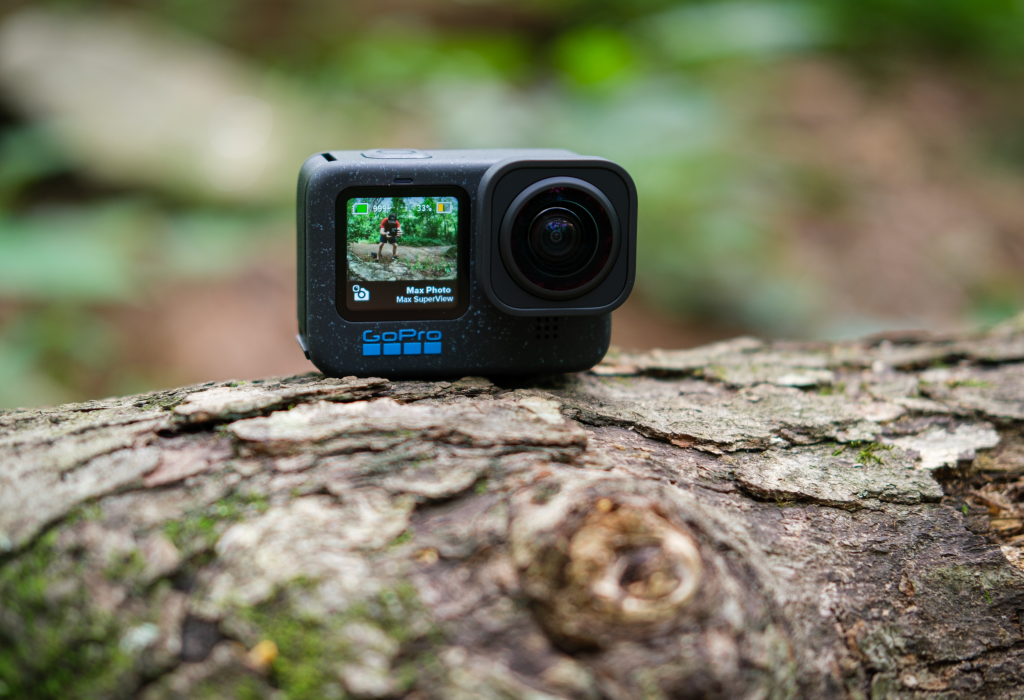
The market for action cameras is a crowded, noisy place. Every year brings a fresh wave of devices promising unparalleled ruggedness, cinematic footage, and features that will supposedly transform your adventures into Hollywood productions. As someone who’s been strapping GoPros to everything from kayaks to camels since 2014, I’ve seen enough marketing hype to know that the real story often lies in the subtle nuances, the practical improvements, and the features that actually make a difference when you’re out in the wild. So, when the GoPro Hero 12 Black landed, my immediate question wasn’t about its headline specs, but rather: does it truly elevate the action camera experience, or is it just another incremental step in a relentless upgrade cycle?
I’ve put this camera through its paces, from the bustling streets of Marrakech to the serene waters of the Scottish Highlands, and I’ve got opinions. This isn’t a regurgitation of a spec sheet; it’s a deep dive into what the Hero 12 Black genuinely offers, what its limitations are, and whether it deserves a spot in your kit bag.
What You’ll Actually Get From This Guide
- An honest, no-fluff assessment of the GoPro Hero 12 Black’s real-world performance.
- Insights into whether HyperSmooth 6.0 and the 8:7 sensor are genuine game-changers or just clever marketing.
- Practical advice on managing battery life, leveraging wireless audio, and navigating the GoPro accessory ecosystem.
- A direct comparison with its main rival, the DJI Action 4, helping you decide which is truly right for you.
- My personal recommendations on who should upgrade, who should save their money, and common pitfalls to avoid.
The Unspoken Truth About Action Cameras: Why the Hype Persists (and Why It Should)
Let’s be frank: the action camera market is saturated. Yet, despite the proliferation of smartphones with increasingly capable cameras, and a host of cheaper alternatives, the desire for a dedicated action camera persists. Why? Because a smartphone, no matter how advanced, simply cannot replicate the sheer ruggedness, the diminutive form factor, and the sheer abuse-taking capability of a well-built action camera. I’ve dropped GoPros from heights, submerged them in saltwater, and subjected them to dust storms that would render any phone useless. They just keep going.
My journey with action cameras began with a GoPro Hero 3+ Black, a camera that felt revolutionary at the time. Since then, I’ve owned every iteration up to the Hero 11, documenting countless trips, dives, and adventures. This isn’t just about capturing memories; it’s about capturing experiences from perspectives that a traditional camera simply can’t achieve. The ability to mount a camera to your helmet as you cycle through the Atlas Mountains, or attach it to a surfboard to catch that perfect wave, fundamentally changes the narrative of your travel footage. It transforms you from an observer into a participant, bringing viewers directly into the heart of the action.
However, this persistent hype also comes with a caveat: the relentless cycle of “new and improved” models. Each year, we’re presented with incremental upgrades, often leaving consumers wondering if the jump is truly worth the investment. My approach has always been to cut through the marketing jargon and focus on what genuinely enhances the user experience and the final output. The Hero 12 Black, while not a revolutionary leap, brings some genuinely thoughtful improvements that address long-standing pain points for seasoned users like myself.
GoPro Hero 12 Black: What’s Actually New (and What’s Just Marketing Spin)
Upon first glance, the Hero 12 Black looks almost identical to its predecessor, the Hero 11 Black. GoPro has stuck with the familiar rugged polycarbonate body, the dual-screen setup (a 1.4-inch front LCD and a larger 2.27-inch rear touchscreen), and the robust waterproofing up to 10 metres without an additional housing. This aesthetic consistency is both a blessing and a curse; it means existing accessories largely remain compatible, but it also means the ‘wow’ factor of unboxing a truly new device is somewhat diminished. So, what is actually new?
The most significant, and frankly, most welcome, physical change is the addition of a standard 1/4-20 mounting thread between the folding fingers at the base. This might sound trivial, but for anyone who’s ever struggled with proprietary mounts or wished for more universal compatibility, it’s a game-changer. It means you can now directly attach the Hero 12 Black to a vast array of standard camera tripods, monopods, and accessories without needing an adapter. This immediately expands the camera’s versatility, making it far easier to integrate into existing camera rigs or simply mount it more securely on a mini-tripod for vlogging. It’s a pragmatic improvement that speaks volumes about GoPro finally listening to its user base.
Internally, the camera largely retains the impressive 27MP 8:7 aspect ratio sensor and the GP2 processor from the Hero 11 Black. This isn’t necessarily a bad thing; these components were already excellent. The real ‘new’ features are primarily software-driven or relate to connectivity and power management. We’re talking about improvements to battery life, enhanced image stabilisation (HyperSmooth 6.0), and the long-awaited wireless audio support. While these aren’t groundbreaking from a core hardware perspective, their cumulative effect on the user experience is noticeable. It’s an evolution, not a revolution, but one that addresses key areas where previous models felt slightly lacking.
HyperSmooth 6.0: Is It Really That Smooth? My Field Test Results
GoPro’s HyperSmooth stabilisation has been a standout feature for several generations, setting a high bar for what’s possible in a compact action camera. With the Hero 12 Black, we get HyperSmooth 6.0, promising even smoother footage. My cynical side always questions these incremental version numbers – is it truly a significant leap, or just a minor tweak to justify a new model? After extensive field testing, I can confidently say that HyperSmooth 6.0 is genuinely impressive, though it’s not magic.
I put it through its paces in various challenging scenarios. Mountain biking down rocky trails, where vibrations and sudden impacts are constant, yielded remarkably stable footage. Walking through a bustling market in Marrakech, with all the jostling and uneven ground, resulted in footage that felt like it was shot on a gimbal. Even during a rather choppy boat ride off the coast of Scotland, the camera managed to iron out a surprising amount of motion. The horizon levelling, now available even with HyperSmooth Max Lens Mod 2.0, is particularly effective, keeping your shots perfectly straight even when the camera itself is tilted significantly.
However, it’s crucial to understand its limitations. HyperSmooth works by digitally cropping the image, meaning you lose a small portion of your field of view. While the effect is astonishing, it’s not going to completely negate extreme, violent movements. If you’re expecting buttery-smooth footage while skydiving without any external stabilisation, you might still be slightly disappointed. Furthermore, in very low-light conditions, the digital processing required for HyperSmooth can sometimes introduce a subtle softness or noise, a common trade-off with any digital stabilisation. For the vast majority of users, though, HyperSmooth 6.0 is an absolute triumph, allowing you to capture incredibly stable footage without needing cumbersome external gear. It truly allows you to “set it and forget it” when it comes to stability.
The 8:7 Sensor and HDR Video: Unlocking Creative Freedom (or Just More Work?)
The Hero 12 Black inherits the large 8:7 aspect ratio sensor from its predecessor, and this is a feature that I believe is still widely underutilised and misunderstood. Unlike traditional 16:9 sensors, the 8:7 aspect ratio captures significantly more vertical information. Why does this matter? Because it offers unparalleled flexibility in post-production. You can easily crop your footage to a cinematic 16:9 for YouTube, a vertical 9:16 for TikTok or Instagram Reels, or a square 1:1 for other social platforms, all from the same original recording, without losing significant detail or needing to shoot multiple versions. This is a huge time-saver for content creators who publish across different platforms.
However, this flexibility comes with a caveat: it often means more work in post-production. If you’re accustomed to simply uploading your footage straight from the camera, the 8:7 aspect ratio might feel like an unnecessary step. To truly leverage its power, you need to be comfortable with basic editing software to reframe your shots. For me, the creative freedom it offers is well worth the extra effort, allowing me to decide on the final composition long after the shot has been captured.
Another significant addition is HDR (High Dynamic Range) video mode. This feature aims to improve the handling of highlights and shadows, resulting in more balanced and dynamic shots, particularly in scenes with high contrast – think bright skies and deep shadows. In my tests, HDR video was most effective in bright, sunny conditions, where it did an excellent job of preserving detail in both the brightest and darkest areas of the frame. The clouds weren’t blown out, and the details in shaded areas remained visible. However, in lower light, or with very fast-moving subjects, I found that HDR could occasionally introduce a slightly artificial look or subtle ghosting artefacts. It’s a powerful tool, but one that requires a discerning eye to use effectively. It’s not a ‘set it and forget it’ feature for every scenario, but for landscapes and slower-moving scenes with tricky lighting, it’s a welcome addition.
Battery Life in the Wild: Managing Expectations for the Hero 12 Black
Battery life has always been the Achilles’ heel of action cameras, and while the Hero 12 Black makes strides, it’s still crucial to manage your expectations. GoPro claims impressive runtimes: up to 70 minutes of 5.3K 60p video and up to 58 minutes of 4K 120p video. These figures represent a significant improvement over previous models, largely due to better power management and the inclusion of the Enduro battery as standard (which was an optional extra for the Hero 11).
In my real-world testing, these numbers are achievable under ideal conditions – typically, when recording continuously in a moderate climate without constantly checking the screen, using Wi-Fi, or GPS. However, throw in colder temperatures (common in many adventure sports), frequent stop-starts, reviewing footage on the rear screen, or enabling Wi-Fi for remote control or quick transfers, and those numbers will drop considerably. For example, a day of skiing in freezing conditions saw battery life plummet faster than expected, despite the Enduro battery’s improved cold-weather performance.
My unwavering advice for any serious adventurer or content creator is this: always carry spare batteries. For a full day of shooting, I typically pack at least two additional Enduro batteries, sometimes three. A portable power bank capable of charging GoPro batteries (or the camera itself) is also an invaluable addition to your kit, especially for multi-day trips where wall outlets are scarce. The improved efficiency of the Hero 12 Black is commendable, making it less of a battery hog than its predecessors, but it doesn’t negate the fundamental need for backup power. Think of the extended battery life as a welcome buffer, not a license to leave your spares at home.
Audio Matters: Finally, a GoPro That Plays Nice with Your AirPods
For years, GoPro’s Achilles’ heel, particularly for vloggers and content creators, has been its audio performance. While the built-in microphones are decent for capturing ambient sound, they’ve never been stellar for clear voice recording, especially in windy conditions or when the camera is mounted far from the subject. The solution often involved cumbersome external microphone adapters or the Media Mod, adding bulk and complexity. With the Hero 12 Black, GoPro has finally addressed this with native Bluetooth audio support.
This means you can now connect wireless headphones like Apple AirPods Pro or other Bluetooth earbuds directly to the camera for audio recording. This is a genuinely transformative feature for casual vlogging, interviews, or simply capturing your own commentary while on the move. I tested this extensively with my AirPods Pro, and the results were surprisingly good. The audio was clear, crisp, and significantly better than the internal microphones, especially when speaking directly into the AirPods’ mic. The ability to monitor audio wirelessly is also a huge plus, ensuring you’re actually capturing what you intend to.
However, it’s not a perfect solution. Bluetooth range can be a limiting factor, and in crowded environments with a lot of wireless interference, I did experience occasional dropouts. For professional-grade audio, a dedicated wired lavalier microphone or a high-quality shotgun mic connected via the Media Mod will still offer superior results and reliability. But for convenience, for capturing quick vlogs, or for simply adding clear narration to your adventure footage without wires or bulky setups, the Bluetooth audio feature is a monumental step forward. It makes the Hero 12 Black a much more versatile tool for creators who value portability and simplicity in their audio workflow.
Max Lens Mod 2.0: The Ultra-Wide View You Might Not Need (But Will Want)
GoPro has always been synonymous with wide-angle, immersive footage, and the Max Lens Mod series takes this to the extreme. The Hero 12 Black introduces the Max Lens Mod 2.0, an accessory that pushes the field of view even wider, up to a staggering 177 degrees. This is beyond what the standard lenses offer and is designed for those truly epic, all-encompassing shots.
When you attach the Max Lens Mod 2.0, the camera transforms, offering an incredibly immersive perspective. This is perfect for extreme sports where you want to capture as much of the action and environment as possible – think surfing, mountain biking, or skiing. It’s also fantastic for capturing vast landscapes or architectural shots where you want to emphasise scale and grandeur. The horizon levelling capabilities are also enhanced with this mod, allowing for perfectly level footage even when the camera is rotated 360 degrees, which is frankly mind-bending to witness in action.
However, this ultra-wide perspective isn’t for everyone, nor is it suitable for every shot. The extreme wide-angle naturally introduces significant barrel distortion, which can be creatively used but might not be desired for all types of footage. It also adds an extra piece of glass to the front of your camera, making it slightly more vulnerable to scratches and impact, and it’s an additional cost. For casual users, the standard wide lens options on the Hero 12 Black are more than sufficient. The Max Lens Mod 2.0 is a niche accessory for those who truly need that extreme field of view and are willing to embrace its unique characteristics. If you’re chasing those truly immersive, “you are there” POV shots, then it’s a brilliant addition, but don’t consider it an essential purchase for general use.
GoPro Hero 12 Black vs. DJI Action 4: A Head-to-Head Showdown
In the action camera arena, the most direct and formidable competitor to the GoPro Hero 12 Black is undoubtedly the DJI Action 4. Both cameras offer exceptional performance, but they approach the market with slightly different philosophies and strengths. Having used both extensively, I can tell you that the choice often boils down to specific priorities.
The DJI Action 4 excels particularly in its low-light performance. Its larger sensor and advanced image processing deliver noticeably cleaner and more detailed footage in challenging lighting conditions compared to the Hero 12 Black. If you frequently shoot indoors, at dusk, or in dimly lit environments, the Action 4 has a clear advantage. DJI’s colour science also tends to produce a slightly more natural and cinematic look straight out of the camera, requiring less post-processing for some users. Its magnetic mounting system is also incredibly innovative and convenient, allowing for lightning-fast attachment and detachment of accessories.
However, the Hero 12 Black holds its own, and in some areas, surpasses the Action 4. HyperSmooth 6.0 is arguably still the best in-camera stabilisation on the market, providing an almost gimbal-like smoothness that’s hard to beat. The 8:7 sensor offers unparalleled flexibility for reframing content for different social media platforms, a huge boon for creators. The new 1/4-20 mounting thread significantly enhances versatility with third-party accessories, and the GoPro ecosystem, with its vast array of mounts and the Quik app, is incredibly mature and user-friendly. The addition of wireless audio support also gives the Hero 12 Black a significant edge for vloggers.
Here’s a quick comparison:
| Feature | GoPro Hero 12 Black | DJI Action 4 |
|---|---|---|
| Sensor | 27MP 8:7 Aspect Ratio | 1/1.3-inch (larger for low light) |
| Max Video Resolution | 5.3K 60fps, 4K 120fps | 4K 120fps |
| Stabilisation | HyperSmooth 6.0 | RockSteady 3.0+ |
| Low Light Performance | Good, but not class-leading | Excellent (stronger in dim conditions) |
| Mounting System | Standard GoPro folding fingers + 1/4-20 thread | Magnetic quick-release |
| Wireless Audio | Bluetooth for headphones/mics | No native Bluetooth mic support (requires DJI Mic) |
| Battery Life (claimed) | 70 mins (5.3K 60p) | 160 mins (1080p 30fps) |
| Aspect Ratio Flexibility | Superior (8:7 sensor) | Standard 16:9, 4:3 |
My verdict? If low-light performance and a more cinematic look straight out of the camera are your absolute top priorities, the DJI Action 4 is a compelling choice. However, for sheer versatility, best-in-class stabilisation, and a more robust ecosystem for creators who need to adapt content for multiple platforms, the GoPro Hero 12 Black still holds the crown. It’s a tough call, but the GoPro’s overall package often feels more complete for the true action adventurer.
Navigating the GoPro Ecosystem: Quik App and Must-Have Mounts
One of GoPro’s enduring strengths isn’t just the camera itself, but the entire ecosystem built around it. This includes a vast array of proprietary and third-party mounts, and the surprisingly capable Quik app. For anyone new to GoPro, or even seasoned users looking to streamline their workflow, understanding this ecosystem is key to getting the most out of your camera.
The Quik app, available for free on iOS and Android, is far more than just a remote control. It acts as a hub for offloading footage, performing quick edits, and even creating automated highlight reels. Its auto-edit feature, which intelligently selects clips and syncs them to music, is surprisingly effective for generating shareable content in minutes – perfect for those quick social media updates while still on your trip. While it’s not a professional editing suite, it’s incredibly intuitive for casual users and offers enough power for most travel vlogs. The cloud backup option (with a GoPro subscription) is also a lifesaver, ensuring your precious footage is safe even if your camera takes an unexpected plunge.
When it comes to mounts, the options are seemingly endless, but a few stand out as truly essential for any adventurer:
- Chest Mount: Provides an incredibly immersive, hands-free, first-person perspective that truly puts viewers in your shoes. Essential for cycling, skiing, hiking, or anything where your hands are occupied.
- Head Strap/Helmet Mount: Similar to the chest mount but offers a higher perspective, great for capturing