 abujiggy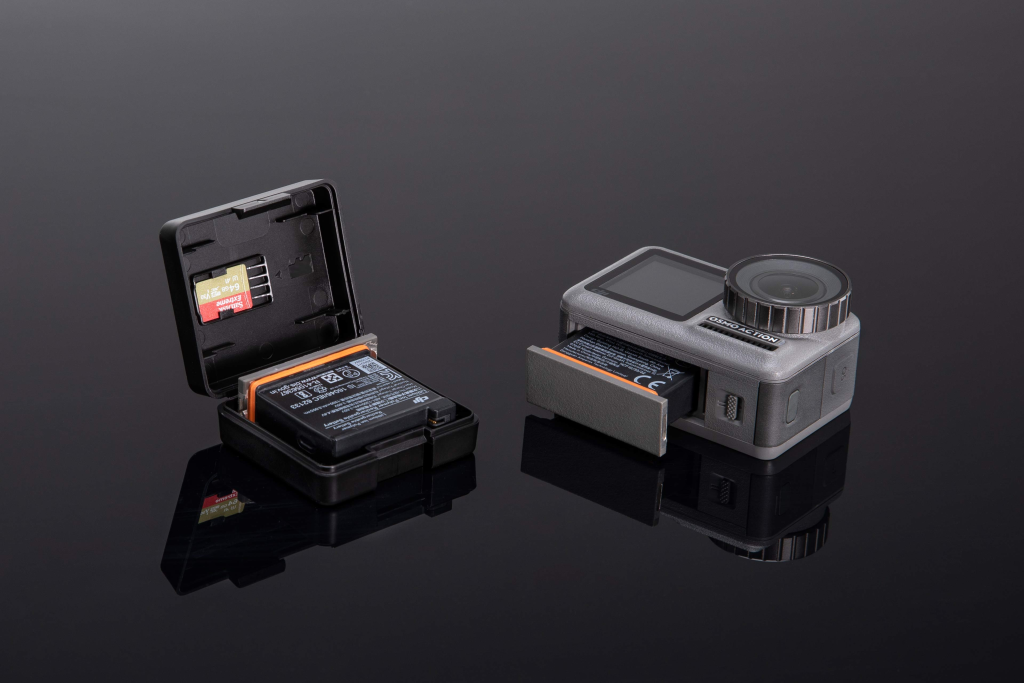
The DJI Osmo Action is a camera that, for many, punches well above its weight. It’s the kind of device you strap to a helmet, mount on a bike, or shove into a backpack, trusting it to capture the chaos and beauty of your adventures without fuss. It’s a tool for spontaneity, for moments you want to relive without the shaky, unfocused mess that phone footage often becomes. But for all its technological prowess – the 4K, the rock-steady stabilisation – it’s all rendered useless if the little black rectangle inside can’t keep up.
This is where the battery, often an afterthought in the grand scheme of camera specs, becomes the absolute linchpin. You’ve just summited a peak, the view is breathtaking, the wind is howling – and your Osmo Action blinks out. Or you’re mid-descent on a mountain bike trail, the perfect shot is unfolding, and suddenly, black screen. It’s the digital equivalent of a car running out of petrol miles from anywhere. We’ve all been there, and it’s infuriating.
So, let’s talk about the DJI Osmo Action’s battery. Is it the silent hero that powers your epic tales, or is it a ticking clock that cuts your adventures short? I’ve spent time with this camera, pushing it in various scenarios, and I’ve got some thoughts on how this crucial component holds up, what you can realistically expect, and how to manage it so it doesn’t become the weakest link in your adventure kit.
***
**What You’ll Actually Get From This Guide:**
* **Real-World Battery Life Expectations:** Forget the marketing numbers; we’ll break down how long you can *actually* expect to record in different conditions.
* **Charging Strategies:** How to get back to shooting quickly and what to do when you’re off the grid.
* **The Integrated Port Advantage:** Why this seemingly small feature is a game-changer for convenience and durability.
* **Maximising Battery Health:** Tips to ensure your battery lasts not just for your trip, but for years of use.
* **When You Absolutely Need Spares:** Identifying the scenarios where the stock battery just won’t cut it.
***
## The 1300mAh Heart of the Osmo Action: Capacity and Performance
Let’s get straight to it: the DJI Osmo Action comes with a 1300mAh battery. On paper, this might sound a little modest, especially when you see action cameras from competitors boasting larger capacities. My initial thought was, “Is this going to be enough?” The answer, as is so often the case with tech, is a nuanced “it depends.”
In my testing, under reasonably favourable conditions – think a mild temperature, shooting in 4K at 30 frames per second, with Wi-Fi and Bluetooth turned off – I consistently got between 60 and 90 minutes of continuous recording. That’s a solid hour to ninety minutes. For many users, this is perfectly adequate. It’s enough to capture a decent chunk of a hike, a significant portion of a bike ride, or a good amount of casual vlogging footage. It’s not a battery that’s going to leave you stranded during a single, focused activity.
However, the caveat is significant. Action cameras are, by definition, used in *action*. And action often involves conditions that are less than ideal for battery life.
### The Battery Drainers: What Really Saps Power
I’ve found several factors that can dramatically reduce that 60-90 minute window:
* **Higher Frame Rates and Resolutions:** Pushing the camera to 4K at 60fps or even 1080p at 120fps for slow-motion playback is a power hog. The processor is working overtime, and that translates directly to faster battery drain. Expect to see that 90-minute figure shrink considerably, perhaps down to 45-60 minutes or even less in some cases.
* **Cold Temperatures:** This is a universal battery killer, and the Osmo Action is no exception. If you’re skiing, snowboarding, or hiking in winter, the cold will significantly reduce your battery’s efficiency. I’ve experienced batteries that were fully charged at room temperature suddenly showing a quarter charge after just 15 minutes in sub-zero conditions. You’ll need to keep spares warm against your body.
* **Wi-Fi and Bluetooth:** Using the camera’s wireless connectivity for live view on your phone or for transferring files is convenient, but it’s also a constant drain. If you’re relying on the app for framing shots or reviewing footage frequently, factor in a reduced recording time.
* **Screen Brightness and Usage:** While not as significant as the above, keeping the rear screen at maximum brightness and constantly waking the camera up by tapping the screen will also consume more power.
So, while the 1300mAh battery is competent, understanding these drainers is crucial for planning your shoots. For anything beyond a casual afternoon, you *will* need spares.
## The Recharge Race: Charging Speed and Options
One of the most frustrating aspects of any portable electronic device is how long it takes to charge. When you’re on an adventure, downtime is precious. Thankfully, DJI has done a commendable job with the Osmo Action’s charging speed.
Using the camera’s USB-C port and a reasonably modern power adapter – the guide mentions an 18W charger specifically, which is a good benchmark – I found a full recharge typically took around 1.5 hours. This is, in my opinion, perfectly acceptable for this class of device. It means that during a lunch break, an evening at your accommodation, or even a longer stop on a trail with a power bank, you can get a significant chunk of juice back into the battery.
However, it’s worth noting that “decent” doesn’t always mean “best in class.” Some newer action cameras and dedicated battery chargers can achieve faster top-ups, sometimes getting you to 80% in under an hour. For the Osmo Action, 1.5 hours is the benchmark to expect.
### Beyond the Camera: Dedicated Chargers and Power Banks
The convenience of charging the battery *in situ* is fantastic, but for extended trips, you’ll want a more efficient workflow. This is where a dedicated external battery charger becomes invaluable. These chargers typically allow you to charge two or even three batteries simultaneously. You can plug the charger into a wall socket, a car adapter, or a USB power bank, and have multiple batteries ready to go.
I found a third-party dual battery charger for the Osmo Action to be a lifesaver. It meant I could always have one fully charged battery ready to swap in while the other(s) were topping up. This significantly minimised downtime.
When it comes to power banks, the key is to ensure they have sufficient output (ideally 18W or higher) to charge the Osmo Action efficiently. A low-output power bank will still charge the camera, but it will take considerably longer, potentially negating the benefit of having it with you.
## The Integrated Port: A Small Feature, A Big Win
This is, for me, one of the most underrated aspects of the DJI Osmo Action’s battery design. The battery itself features an integrated charging port. What does this mean in practice? It means you can plug your USB-C cable directly into the battery *without removing it from the camera*.
Why is this such a big deal?
1. **Convenience:** No more fumbling with tiny battery doors. You just open the main flap, plug in the cable, and you’re charging. This is especially useful in cold weather when your fingers are numb, or when you’re in a dusty or wet environment and want to minimise exposure of the camera’s internals.
2. **Durability:** The battery door on action cameras is often a weak point. It’s small, fiddly, and prone to being lost or broken. By allowing direct charging of the battery, DJI reduces the need to constantly open and close this door, thereby reducing the risk of damage or loss. It’s a simple design choice that adds a layer of robustness.
3. **Reduced Risk of Dirt/Water Ingress:** Every time you open a port or a door on an action camera, you risk letting in dust, sand, or water. The integrated charging port means you can keep the camera sealed and protected while still topping up the battery.
It’s a small detail, but in the world of action cameras where reliability and ease of use in challenging conditions are paramount, this integrated port is a genuine advantage. It streamlines the charging process and adds a welcome element of peace of mind.
## Battery Health and Longevity: Keeping Your Power Source Alive
One of the perennial questions with any rechargeable lithium-ion battery is: how long will it last? DJI, like many manufacturers, is often tight-lipped about specific cycle life figures for their camera batteries. They don’t typically publish data stating, “This battery is rated for 500 charge cycles.”
However, based on my experience and anecdotal evidence from other users, the DJI Osmo Action battery generally holds up well over time. I haven’t personally seen a battery degrade significantly within the first year or two of moderate use. The key to longevity with any lithium-ion battery is to treat it well.
Here are some best practices I’ve adopted:
* **Avoid Extreme Temperatures (When Not in Use):** Don’t leave your spare batteries baking in a hot car all summer or freezing in a shed during winter. Store them in a cool, dry place.
* **Don’t Store Fully Depleted or Fully Charged for Long Periods:** If you’re putting a battery away for an extended period (months), aim for a charge level of around 50-60%. Storing a battery at 100% or 0% for a long time can stress the cells.
* **Use a Quality Charger:** While the camera’s built-in charging is convenient, using a reputable third-party charger can sometimes offer better trickle charging and battery management.
* **Avoid Deep Discharges:** Try not to let the battery drain completely to 0% regularly. It’s better to swap in a fresh battery when it gets down to 10-20%.
The integrated charging port, as mentioned earlier, likely contributes positively to longevity by reducing the physical stress associated with repeatedly opening and closing the battery door. This minimises the chance of mechanical wear and tear on the camera body itself, which indirectly protects the battery compartment.
## The Case for Spares: When One Battery Isn’t Enough
Let’s be brutally honest: the 1300mAh battery, while competent, is rarely enough for a full day of serious action camera use. If you’re planning anything more than a few hours of shooting, or if you know you’ll be in situations where recharging is difficult or impossible, carrying spare batteries isn’t a luxury; it’s a necessity.
When do you absolutely need spares?
* **Full-Day Excursions:** Hiking, camping trips, long cycling routes, or days spent at a theme park.
* **Cold Weather Activities:** Skiing, snowboarding, winter hiking – where battery performance is inherently compromised.
* **Extended Filming Sessions:** If you’re documenting an event, a long journey, or a multi-stage adventure where you can’t guarantee access to power.
* **Time-lapse or Long Exposure Photography:** These modes can run for extended periods, draining the battery significantly.
* **High-Resolution/High-Frame-Rate Shooting:** If you’re constantly recording at 4K 60fps or similar demanding settings.
* **Travel Days:** Airport layovers, long train journeys, or road trips where you might not have consistent power access.
I personally always travel with at least two spare batteries for my Osmo Action. This gives me a total of three batteries, which is usually sufficient for a full day of varied shooting. For multi-day trips without reliable power, I’ll bring even more, along with a robust power bank and a multi-battery charger.
## Third-Party Batteries: A Viable Alternative?
The official DJI Osmo Action battery isn’t exorbitantly priced, but it’s not cheap either. This naturally leads to the question: what about third-party batteries?
You’ll find numerous options on marketplaces like Amazon, often advertised as compatible replacements, sometimes at a fraction of the official price. Some even claim higher capacities (e.g., 1400mAh or 1500mAh).
My experience with third-party batteries for action cameras has been… mixed.
* **The Good:** Sometimes, you can find perfectly functional, cheaper alternatives that work reliably. They offer a cost-effective way to stock up on spares.
* **The Bad:** Quality control can be inconsistent. I’ve had third-party batteries that either didn’t fit properly, didn’t hold a charge well, reported incorrect battery levels, or even failed after only a few charge cycles. There’s also a potential, albeit small, risk of using non-certified batteries causing damage to the camera’s charging circuitry.
* **Higher Capacity Claims:** Be sceptical of batteries claiming significantly higher mAh ratings than the official one. Often, these are inaccurate, or the battery uses lower-quality cells that don’t deliver the advertised performance or longevity.
**My recommendation:** If you opt for third-party batteries, stick to reputable brands with good reviews. Buy one first, test it thoroughly, and if it performs well, then consider buying more. For critical shoots or if you prefer absolute peace of mind, the official DJI battery is always the safest bet.
## Powering Up Off-Grid: The Role of Power Banks
When your adventures take you away from wall sockets, power banks become your best friend. For the Osmo Action, the key is choosing a power bank with sufficient output. As mentioned, the camera charges best with a charger capable of at least 18W.
A good quality power bank with a USB-C Power Delivery (PD) port is ideal. This allows for faster charging of the camera and can also be used to charge other devices like your phone or tablet.
When selecting a power bank, consider:
* **Capacity (mAh):** This determines how many times you can recharge your camera batteries. A 10,000mAh power bank can typically recharge the Osmo Action battery about 2-3 times, depending on efficiency losses. A 20,000mAh unit will give you significantly more charges.
* **Output Power (W):** Look for at least 18W, preferably higher, especially if it has a USB-C PD port.
* **Number of Ports:** If you need to charge multiple devices simultaneously.
* **Durability:** For rugged adventures, a power bank with a ruggedised, water-resistant casing might be a worthwhile investment.
I always carry a mid-sized (around 15,000-20,000mAh) power bank on multi-day trips. It’s usually enough to keep my camera and phone topped up without being excessively heavy.
## DJI Osmo Action Battery vs. Competitors: A Quick Comparison
It’s always useful to see how a component stacks up against the competition. While the Osmo Action itself has evolved into the Action 3 and Action 4 (with different batteries), this comparison focuses on the original Osmo Action battery.
| Feature | DJI Osmo Action (Original) Battery | GoPro HERO9/10/11 Black Battery | Insta360 ONE RS 1-Inch Battery |
| :————— | :——————————— | :—————————— | :—————————– |
| **Capacity** | 1300mAh | 1720mAh (Enduro) | 1300mAh |
| **Voltage** | 3.85V | 3.85V | 3.6V |
| **Advertised Life** | ~60-90 mins (4K/30fps) | ~55-110 mins (5.3K/30fps) | ~70 mins (5.3K/30fps) |
| **Charging Speed** | ~1.5 hrs (18W charger) | ~2.5 hrs (official charger) | ~70 mins (official charger) |
| **Cold Weather** | Significantly Reduced | Improved with Enduro battery | Moderate Impact |
| **Integrated Port** | Yes | No | No |
| **Price (approx.)** | £30-£40 | £25-£35 (Enduro) | £35-£45 |
*Note: Advertised life varies greatly with settings and conditions. Prices are estimates and subject to change.*
As you can see, the original Osmo Action battery sits in the middle. Its capacity isn’t the highest, but it’s not the lowest either. The integrated charging port is a unique selling point that competitors lack. GoPro’s Enduro battery offers better cold-weather performance and slightly higher capacity, while Insta360’s offering is comparable in capacity but lacks the integrated port convenience.
## Common Mistakes to Avoid with Your Osmo Action Battery
Based on my experience and observations, here are a few pitfalls to steer clear of:
* **Assuming One Battery is Enough:** This is the most common mistake. Unless you’re doing very short, infrequent recordings, you *will* need spares.
* **Not Packing a Charger or Power Bank:** Even if you have spares, they’re useless if you can’t recharge them. Always pack your charging solution.
* **Leaving Batteries in Extreme Cold:** Don’t expect full performance. Keep spares warm against your body.
* **Charging with Low-Power Adapters:** It will take forever. Use a decent 18W+ charger or power bank.
* **Ignoring Battery Health:** Treating your batteries poorly (e.g., constant deep discharges, extreme temps) will shorten their lifespan.
* **Buying the Absolute Cheapest Third-Party Option:** Stick to reputable brands or the official DJI battery to avoid potential issues.
## Frequently Asked Questions
### How long does the DJI Osmo Action battery actually last?
In ideal conditions, shooting 4K at 30fps with Wi-Fi off, expect around 60-90 minutes of continuous recording. However, demanding settings, cold weather, and Wi-Fi usage can significantly reduce this to 45 minutes or less.
### Can I charge the battery without removing it from the camera?
Yes, the DJI Osmo Action battery features an integrated charging port, allowing you to charge it directly while it’s inside the camera. This is a major convenience feature.
### How long does it take to charge the DJI Osmo Action battery?
Using an 18W charger, a full charge typically takes about 1.5 hours. Faster chargers might shave off a little time.
### Is the official DJI Osmo Action battery worth the price?
For guaranteed compatibility, performance, and peace of mind, the official battery is often worth the investment, especially if you need reliability. However, reputable third-party options can offer a more budget-friendly way to acquire spares.
### What happens to the battery in cold weather?
Cold temperatures significantly reduce battery performance and capacity. You’ll get much less recording time, and the battery may drain very rapidly. It’s essential to keep spare batteries warm against your body in cold environments.
### How many spare batteries should I carry?
For a full day of moderate use, two spare batteries (giving you three total) is a good starting point. For demanding trips, cold weather, or extended periods without power access, consider carrying more.
## Key Takeaways
* The 1300mAh battery offers 60-90 minutes of recording in ideal conditions, but real-world use, especially in cold or with high settings, is shorter.
* Always pack spare batteries for anything beyond casual, short recording sessions.
* The integrated charging port is a significant convenience and durability feature, allowing charging without removing the battery.
* Charging takes around 1.5 hours with an 18W adapter; faster charging is possible with higher-wattage sources.
* Cold weather is a major battery drainer; keep spares warm.
* Power banks with at least 18W output are essential for off-grid charging.
* Third-party batteries can be cost-effective but come with variable quality; choose reputable brands or stick with official DJI.
***
Ultimately, the DJI Osmo Action battery is a competent performer that gets the job done for most users. Its integrated charging port is a standout feature that enhances usability. However, its capacity isn’t class-leading, and you absolutely must factor in the need for spares and a reliable charging strategy for any serious adventure. Don’t let a dead battery cut your story short.