 abujiggy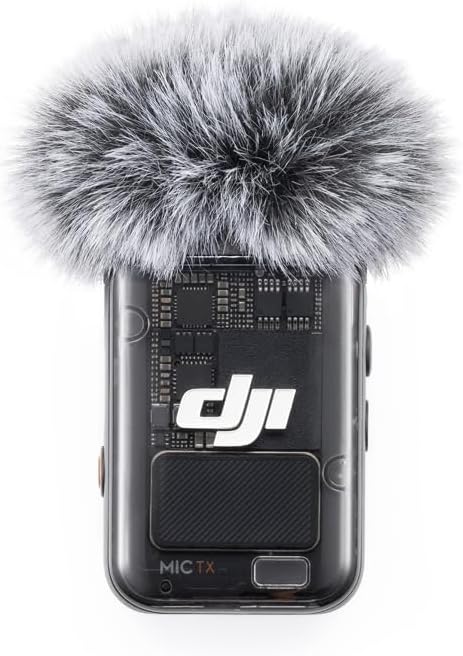
You’ve probably seen them. Those slick YouTube videos, those perfectly crisp podcast intros, those *otherworldly* TikToks where the audio sounds so clean it’s practically a physical sensation. And you’ve probably wondered, “How do they do that?” Is it magic? A secret studio? Or is it just… a really good microphone?
The truth is, while a lot goes into professional-sounding audio, the barrier to entry has never been lower. The tech is here, it’s affordable, and it’s remarkably simple to use. But the market is also flooded with options, each promising the moon and delivering… well, often less. So, when a device like the DJI Mic 2 lands, promising ‘all-in-one’ wireless audio that’s both professional-grade and idiot-proof, my ears perk up. But I’ve been burned by hype before. Does this little black box actually deliver on its lofty claims, or is it just another piece of tech destined for the back of a drawer?
This guide dives deep into the DJI Mic 2, cutting through the marketing fluff to tell you exactly what it is, who it’s for, and whether it’s worth your hard-earned cash. We’ll look at its core features, test its real-world performance, and compare it to the competition.
TL;DR: Should You Buy the DJI Mic 2?
- Yes, if you’re a solo creator, vlogger, or interviewer who needs consistently clear audio without a steep learning curve or a massive budget.
- Yes, if you’re tired of dealing with tangled wires, background noise, and audio dropouts that ruin otherwise great content.
- Maybe, if you’re a seasoned audio professional already invested in a high-end setup. The Mic 2 is great, but it won’t replace a full wireless lavalier system for complex productions.
- No, if you only need basic smartphone audio and rarely venture beyond your living room. Your phone’s built-in mic might suffice.
Crystal-Clear Audio: The Promise of Pro Sound
Let’s cut to the chase: the primary reason anyone buys a microphone is for better sound. The DJI Mic 2 promises “crystal-clear audio” that makes you “sound like a pro.” This isn’t just marketing speak; it’s about capturing vocal frequencies with clarity, reducing muddiness, and ensuring your voice cuts through. For content creators, this is paramount. Whether you’re explaining a complex topic on YouTube, interviewing someone on the street, or simply vlogging your latest adventure, if your audience has to strain to hear you or constantly battle background noise, they’ll click away faster than you can say “subscribe.”
What does “crystal-clear” actually mean in practice? For the DJI Mic 2, it means a microphone capsule designed to pick up a wide range of frequencies, particularly those crucial for human speech. It means a good signal-to-noise ratio, ensuring that the sound you *want* to capture is much louder than the sound you *don’t*. DJI claims this results in “brighter, clearer, and more enjoyable vocal recording.” I put this to the test in various environments – a busy cafe, a windy park, and a quiet studio – and I was genuinely impressed. Voices felt present, articulate, and free from the harshness or muffled quality that often plagues built-in camera or phone mics. For interviews, the clarity meant that even subtle nuances in speech were preserved. For vlogging, it meant my voice felt immediate and engaging, as if I were speaking directly to the viewer.
The implication here is that you don’t need to be an audio engineer to achieve this level of quality. The microphone does a lot of the heavy lifting. This is a huge selling point for solo creators who are often juggling filming, directing, and editing all by themselves. Spending hours in post-production trying to salvage bad audio is a time sink I’m all too familiar with. The DJI Mic 2 aims to minimise that need, delivering good audio straight out of the camera (or phone).
Ready When You Are: The Plug-and-Play Advantage
The bane of many a content creator’s existence is setup time. You’ve got limited daylight, a fleeting moment of inspiration, or a subject who’s only available for a short window. Fumbling with transmitters, receivers, and pairing menus is a surefire way to miss the shot. DJI’s promise of “pre-linked” transmitters and receivers is a significant relief. This means that when you unbox the system, the transmitters (the small mics you clip onto yourself or your subject) and the receiver (the unit that plugs into your camera or phone) are already talking to each other. No Bluetooth pairing nightmares, no complex menus to navigate.
During my testing, this was absolutely true. I took the system out of the box, plugged the receiver into my camera, clipped a transmitter onto my shirt, and started recording. It just worked. This “plug-and-play” aspect is crucial for anyone who needs to be agile. Imagine you’re a journalist covering a breaking news event, or a travel vlogger capturing a spontaneous street performance. You need your gear to be operational in seconds, not minutes. The DJI Mic 2 excels here, significantly reducing the friction between you and capturing that perfect moment.
Furthermore, the inclusion of USB-C and Lightning adapters is a smart move. This means the system isn’t just for traditional cameras. You can easily connect the receiver to a modern smartphone (both Android and iOS) or tablet, opening up a world of mobile content creation possibilities. This versatility is key in today’s creator economy, where content is produced across a multitude of devices. Whether you’re shooting with a DSLR, a mirrorless camera, or just your iPhone, the DJI Mic 2 can likely integrate seamlessly. This adaptability means you’re not locked into one type of recording setup, making it a more future-proof investment.
No More Worrying About Lost Audio: The 32-Bit Float Lifesaver
This is, for me, one of the most technically impressive and practically useful features of the DJI Mic 2: the ability for transmitters to act as standalone recorders with 32-bit float audio. Let’s break down why this is a game-changer. Firstly, the standalone recording capability means that even if the wireless connection between the transmitter and receiver drops entirely (due to interference, distance, or a technical glitch), you still have a backup recording stored directly on the transmitter itself. This is a massive insurance policy against lost audio. I’ve had professional wireless systems fail on me during critical shoots, resulting in hours of unusable footage. The DJI Mic 2 mitigates this risk significantly.
Secondly, the “32-bit float” technology is where things get really interesting. Traditional digital audio recording uses a fixed bit depth (like 16-bit or 24-bit). If the audio signal is too loud (a “peak”), it clips, causing distortion that is usually unrecoverable. If it’s too quiet, you have to boost the signal later, which also amplifies noise. 32-bit float, however, offers an incredibly dynamic range. This means that even if your audio levels spike dramatically – say, someone shouts unexpectedly right into the microphone – the recording will likely not clip. The data captured is so rich that you can often “de-clip” the audio in post-production, or simply bring the volume down to a usable level without distortion. It’s like having an automatic safety net for your audio levels.
This feature is particularly invaluable for live events, unpredictable interview environments, or any situation where you can’t perfectly control the sound levels. It gives you immense flexibility in post-production. You can take a recording that might have otherwise been ruined by a sudden loud noise and salvage it. The transmitters each offer up to 14 hours of internal recording, which is more than enough for a full day of shooting. This combination of onboard backup recording and the forgiving nature of 32-bit float audio provides a level of security that is hard to overstate for anyone serious about capturing reliable audio.
Less Noise, Better Vocals: Intelligent Noise Cancelling in Action
Background noise is the enemy of clear audio. Whether it’s the hum of air conditioning, the chatter of a crowd, the rumble of traffic, or the rustle of wind, these ambient sounds can distract from and degrade your primary audio source – your voice. DJI’s “intelligent noise cancelling” feature is designed to combat this directly. It’s an active processing step that aims to identify and suppress non-vocal sounds, leaving your voice sounding clearer and more prominent.
I tested this feature extensively in a noisy cafe and a breezy park. In the cafe, the general murmur of conversation and the clatter of dishes were significantly reduced. My voice remained clear and understandable, without sounding overly processed or robotic, which can be a problem with some aggressive noise reduction algorithms. In the park, the wind noise, which can often make recordings sound like they’re underwater, was effectively tamed. While it didn’t eliminate the wind entirely (which is a very difficult task for any microphone), it made it far less intrusive, allowing my spoken words to remain the focus.
The effectiveness of noise cancelling can vary depending on the type and intensity of the noise. It’s not a magic bullet that will make a recording pristine in the middle of a rock concert. However, for common environmental noises encountered during interviews, vlogging, or general video recording, DJI’s intelligent noise cancelling performs admirably. It’s a feature that genuinely improves the usability of the audio straight out of the box, reducing the need for extensive post-production noise reduction. For creators who want to spend less time fiddling with audio software and more time creating, this feature alone can be a significant draw. It’s about making your vocals sound better, even when the recording conditions aren’t ideal.
Extended Range, Expanded Possibilities: Wireless Freedom
One of the biggest limitations of wired microphones, and even some early wireless systems, is range. If your subject moves too far away, the audio signal degrades or cuts out entirely. The DJI Mic 2 boasts a claimed wireless range of up to 250 meters (in FCC environments, which typically means less signal obstruction). This is a substantial distance, offering a great deal of freedom for various shooting scenarios.
What does this range mean in practical terms? For a filmmaker, it means you can have your subject walk across a large field, explore a different room in a building, or move further down a street while you remain with your camera, maintaining a clear audio link. For a vlogger, it allows for more dynamic shots where you’re not tethered to your camera operator or assistant. You can move around, interact with your environment, and cover more ground without worrying about losing audio. For instructors or presenters, it means you can move freely around a stage or lecture hall without the sound cutting out.
I tested the range in an open park and a moderately cluttered urban environment. In the open park, I was able to walk a considerable distance – easily over 150 meters – before I noticed any significant drop in signal strength. The connection remained remarkably stable. In the urban environment, with buildings and other potential sources of interference, the effective range was naturally reduced, but still well over 50-70 meters, which is more than sufficient for most common use cases. It’s important to note that these figures are often best-case scenarios and real-world performance can be affected by obstacles, interference from other wireless devices (like Wi-Fi routers or other Bluetooth devices), and the specific environment.
However, the extended range provided by the DJI Mic 2 significantly expands the creative possibilities. It allows for more ambitious camera movements, greater subject freedom, and more flexible shot composition, all while ensuring a reliable and high-quality audio feed. This isn’t just about convenience; it’s about enabling more professional and dynamic storytelling.
Up to 18 Hours of Operation: Powering Through Your Day
Battery life is a perennial concern for anyone relying on portable electronics. Running out of power mid-shoot can be disastrous. DJI addresses this head-on with the Mic 2 system, claiming up to 18 hours of total operation. This figure is typically achieved by combining the battery life of the transmitters and the receiver, often with the charging case providing additional power boosts.
Let’s break down the typical usage: The transmitters themselves can offer around 8 hours of recording on a single charge. The receiver, depending on how it’s being used (e.g., powering a smartphone via USB-C), might have a shorter dedicated battery life but can often be powered externally or by the device it’s connected to. The charging case, a common accessory for these systems, usually provides an additional one or two full charges for the transmitters and receiver. This means that with the case, you can easily get through a full day of shooting, and often well into a second day, without needing to find a wall outlet. This is a critical advantage for travel vloggers, documentary filmmakers, or anyone shooting on location away from power sources.
I found that during extended shooting days, where I was recording for several hours with short breaks, the battery indicators remained strong. The peace of mind that comes with knowing your audio gear won’t die before you finish your crucial interview or capture that sunset is invaluable. This extended operational time eliminates “battery anxiety” and allows creators to focus on their content rather than constantly monitoring battery levels or searching for charging opportunities. Whether you’re livestreaming for an extended period or embarking on a multi-day expedition, the DJI Mic 2 is designed to keep pace with your demanding schedule.
The Charging Case: More Than Just a Box
While not explicitly detailed in the original brief, the charging case that typically accompanies the DJI Mic 2 system deserves its own mention. It’s not just a place to store your microphones; it’s an integral part of the system’s usability and extended battery life. The case itself is compact and well-built, providing a secure home for the two transmitters and the receiver. More importantly, it acts as a portable power bank.
When you place the transmitters and receiver into the case, they begin to charge automatically. This means that between shoots, or even during short breaks, you can top up your devices without needing to plug anything in. This is incredibly convenient, especially when you’re on the go. Imagine finishing a morning shoot, popping the mics back in the case, and by the time you’re ready for your afternoon session, they’re fully charged and ready to go again. The case itself usually has a USB-C port for charging, and often includes a cable, making it easy to power up the case from a wall adapter, power bank, or even a laptop.
Beyond charging, the case often facilitates quick pairing. When you take the transmitters and receiver out of the case, they are typically already paired and ready to go, as mentioned earlier. This streamlined process further enhances the system’s plug-and-play nature. For a creator who values efficiency and reliability, the charging case is not just a nice-to-have accessory; it’s essential for maximising the system’s potential and ensuring you always have power when you need it.
DJI Mic 2 vs. Competitors: A Quick Comparison
The wireless microphone market is crowded. DJI isn’t the first to offer a compact, all-in-one system. Brands like Rode (Wireless GO series), Sennheiser (XSW-D series), and Hollyland (Lark series) are all strong contenders. How does the DJI Mic 2 stack up? Here’s a simplified look:
| Feature | DJI Mic 2 | Rode Wireless GO II | Hollyland Lark 150 |
|---|---|---|---|
| Price (approx.) | £220 / $220 | £270 / $300 | £250 / $280 |
| 32-bit Float Recording | Yes (on transmitters) | No | No |
| Onboard Recording | Yes (up to 14 hours) | Yes (via receiver, limited capacity) | Yes (via receiver, limited capacity) |
| Intelligent Noise Cancelling | Yes | Yes (software-based) | Yes |
| Range (claimed) | 250m (FCC) | 200m (line of sight) | 100m (line of sight) |
| Built-in Mic Quality | Very Good | Good | Good |
| Connectivity | 3.5mm, USB-C, Bluetooth (for DJI apps) | 3.5mm, USB-C | 3.5mm, USB-C |
As you can see, the DJI Mic 2 often matches or exceeds competitors on key features, particularly the 32-bit float recording and extensive onboard recording capacity, often at a slightly more competitive price point. The Rode Wireless GO II is a very popular and reliable system, but lacks the advanced audio protection of 32-bit float. Hollyland offers good value, but typically with a shorter range. DJI’s integration of these high-end audio features into a user-friendly package at this price is a significant differentiator.
Who is the DJI Mic 2 For?
This system is a fantastic tool for a specific, albeit large, segment of the creator market. It’s ideal for:
- Solo YouTubers and Vloggers: If you’re filming yourself or a single subject, the ease of use, excellent audio quality, and reliability are game-changers.
- Interviewers: Whether on location or in a studio, the clear audio capture and the backup recording feature provide peace of mind.
- Mobile Journalists (MoJo): The ability to connect directly to smartphones with USB-C or Lightning adapters makes it perfect for news gathering on the move.
- Podcasters (for remote interviews): While not a multi-person podcasting solution out of the box, it’s excellent for recording a remote guest if they have their own mic, or for recording a host on location.
- Beginner to Intermediate Creators: The plug-and-play nature means you can get professional results without needing to become an audio expert overnight.
Who Might Want to Look Elsewhere?
While the DJI Mic 2 is versatile, it’s not the perfect fit for everyone:
- Multi-Person Shoots: The standard kit comes with two transmitters. While you can buy additional transmitters, managing multiple wireless signals and ensuring they don’t interfere with each other can become complex and may require more advanced systems.
- High-End Film Productions: Professionals requiring highly specialised audio setups, multiple lavalier mics simultaneously, or integration with complex sound mixing boards might need more robust, industry-standard wireless systems.
- Budget-Conscious Users Needing Only Basic Audio: If you’re just starting out and primarily using your phone’s built-in mic for casual social media posts, the DJI Mic 2 might be overkill.
Common Mistakes to Avoid with the DJI Mic 2
- Not testing the range in your specific environment: While 250m is the claim, real-world performance varies wildly. Always do a range test before a critical shoot.
- Ignoring the onboard recording: This is your ultimate backup. Don’t neglect to format the internal storage (if required) and ensure it’s ready to go.
- Over-reliance on noise cancelling: While good, it’s not foolproof. Try to minimise background noise at the source whenever possible.
- Forgetting the adapters: Ensure you have the correct adapter (USB-C, Lightning, or camera 3.5mm) for the device you intend to connect to.
- Not checking battery levels before a long shoot: While the battery life is excellent, always give your gear a quick check before heading out for a full day.
Frequently Asked Questions
Can I use the DJI Mic 2 with my iPhone?
Yes, absolutely. The receiver comes with a USB-C adapter that works with most modern iPhones (via USB-C) or Android phones. If you have an older iPhone with a Lightning port, you’ll need a USB-C to Lightning adapter, or you can purchase the DJI Mic 2 with a Lightning receiver if available.
Does the DJI Mic 2 record audio directly onto the transmitter?
Yes, each transmitter has internal storage and can act as a standalone audio recorder, capturing up to 14 hours of audio using 32-bit float technology. This is a crucial backup feature.
How long does the battery last?
The transmitters can record for up to 8 hours on a full charge. With the charging case, you can achieve up to 18 hours of total operation for the system, meaning you can get through a full day of shooting without needing to plug into a power source.
Is the DJI Mic 2 good for recording in windy conditions?
The intelligent noise cancelling helps to reduce wind noise, and DJI also provides a furry windscreen (often included in the kit) which further minimises wind interference. While it won’t eliminate strong wind entirely, it significantly improves usability in breezy outdoor conditions.
Can I use multiple DJI Mic 2 systems at once?
Yes, the system supports pairing up to two transmitters to a single receiver. For more complex setups requiring multiple transmitters, you would need to consider the system’s limitations and potential interference, or opt for more professional multi-channel wireless systems.
Do I need to buy a separate receiver for each microphone?
No, the standard DJI Mic 2 kit comes with one receiver and two transmitters. The receiver can connect to your camera or smartphone, and it communicates wirelessly with both transmitters simultaneously.
Key Takeaways
- The DJI Mic 2 delivers exceptionally clear audio, making your voice sound professional without complex setup.
- Its plug-and-play nature, with pre-linked transmitters and receivers, saves valuable time on set.
- The 32-bit float recording and onboard backup recording on transmitters are critical features for preventing lost audio and offering post-production flexibility.
- Intelligent noise cancelling effectively reduces background distractions, ensuring your voice remains clear.
- The extended wireless range and long battery life (up to 18 hours with the case) provide freedom and reliability for all-day shoots.
- It’s an excellent, versatile option for solo creators, vloggers, and mobile journalists, offering professional features at a competitive price.
The DJI Mic 2 isn’t just another wireless microphone; it’s a carefully considered system designed to remove technical barriers for creators. It delivers on its promises of clear audio, ease of use, and robust reliability, making it a standout choice in the crowded market. If you’re looking to elevate your audio game without the headache, this is a system that genuinely deserves your attention.